Database Connection Pool Exhaustion at 3 AM
Learn why database connection pools exhaust under leaks, slow queries, and bad lifetimes, and how PgBouncer and sizing prevent outages.
Why this matters
At 3:12 AM, your monitoring fires a critical alert: HTTP 503 Service Unavailable across all endpoints. The application logs show the same exception repeated 4,000 times in 2 minutes: HikariPool-1 - Connection is not available, request timed out after 30000ms. Your database is at 12% CPU. Your application servers have plenty of memory. Everything looks healthy — except no request can get a database connection.
This is connection pool exhaustion. Your application maintains a pool of pre-established database connections (typically 10–50) that threads share. When Thread A needs to run a query, it checks out a connection from the pool, executes the query, and returns the connection. The pool avoids the overhead of creating a new TCP connection for every query (which takes 3–10ms including TCP handshake and PostgreSQL authentication).
The problem is scarcity. A PostgreSQL instance with max_connections = 100 can only handle 100 simultaneous connections. If you have 10 application pods, each with a pool size of 20, you need 200 connections — but only 100 are available.
Even without hitting the database limit, a single slow query holding a connection for 30 seconds instead of 50ms means one connection serves 600× fewer requests per minute. Under load, the pool drains, threads queue up waiting for connections, and your application effectively freezes while the database sits idle.
Practical note When the database is quiet but the app is timing out, look at the pool first. Pool exhaustion often looks like a database outage from the user side.
The mental model
A connection pool operates as a thread-safe resource manager with a bounded set of reusable database connections. The pool maintains two groups: idle connections (available for checkout) and active connections (currently executing queries).
When a thread needs a database connection, it calls pool.getConnection(). The pool checks for available idle connections. If one exists, it’s optionally validated (running SELECT 1 to verify the connection is still alive), then checked out to the requesting thread.
If no idle connection exists and the pool hasn’t reached its max pool size, a new connection is created on demand. If the pool is at maximum capacity, the thread enters a wait queue (FIFO) with a configurable checkout timeout. If no connection becomes available within the timeout, the thread receives a ConnectionTimeoutException.
After the query completes, the connection is returned to the idle pool. If another thread is waiting in the queue, the returned connection is immediately handed off (no idle period). Idle connections that sit unused beyond the idle timeout are destroyed, keeping the pool trim during low-traffic periods. The pool will not shrink below the min pool size.
Connection leaks occur when application code checks out a connection but never returns it — typically due to a missing finally block or an exception that skips the connection.close() call. Leaked connections permanently reduce the effective pool capacity. Leak 5 connections from a pool of 20, and you now have a pool of 15.
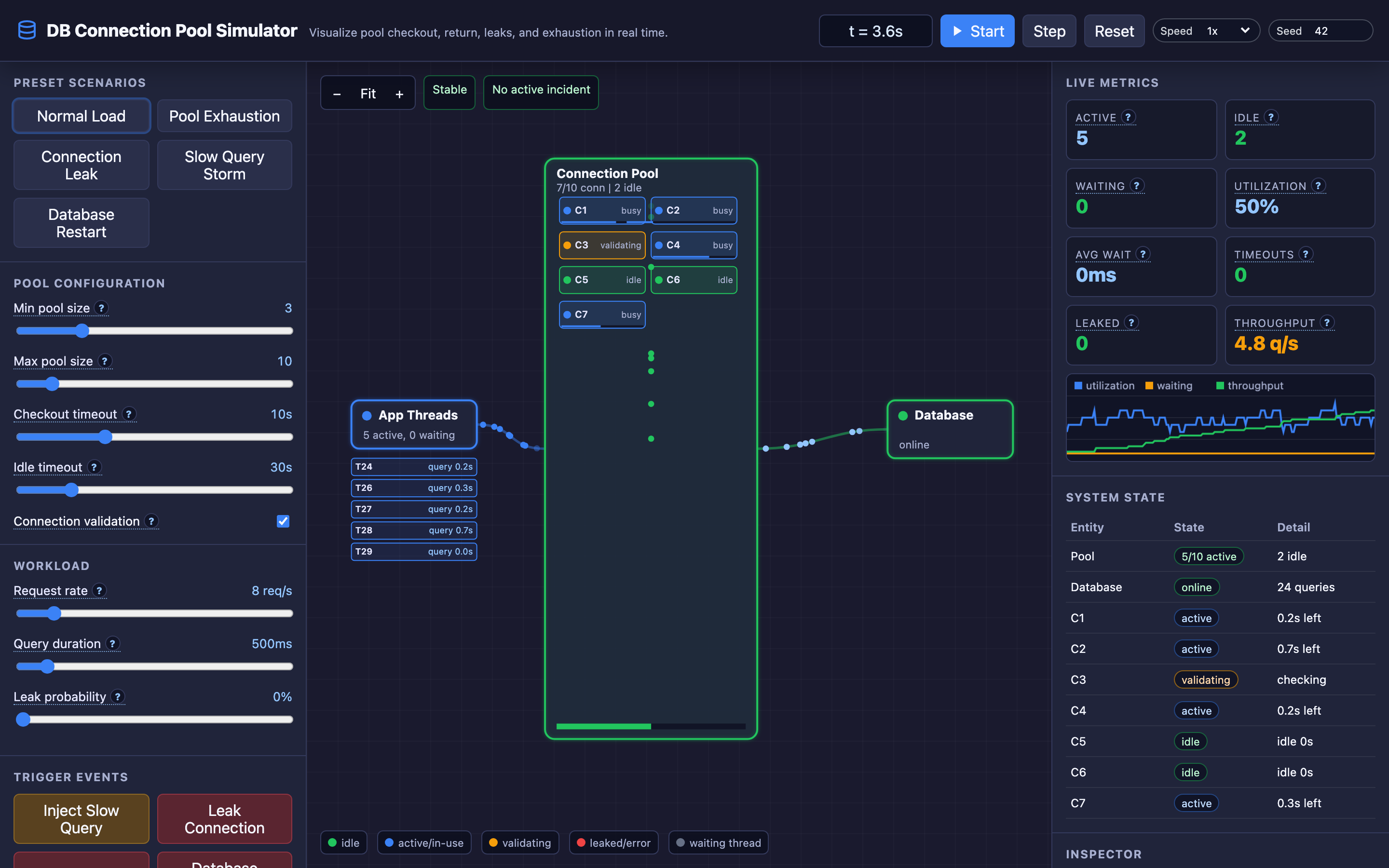
The interactive demo models this directly: set a leak probability and watch the effective pool shrink over time until exhaustion is inevitable.
Decisions that matter
Min Pool Size (Range: 1–10)
The floor of connections maintained even during zero traffic. Setting this to 5 means 5 connections are always established, avoiding cold-start latency when the first requests arrive after an idle period.
The downside: each idle connection consumes ~10MB of memory on the PostgreSQL server (work_mem + session buffers). With 50 application pods × min pool of 5 = 250 permanently held connections.
Max Pool Size (Range: 5–50)
The ceiling of total connections the pool will create. HikariCP’s default is 10, which is often too small for high-throughput applications and too large for database servers with many application clients.
The optimal formula from HikariCP’s wiki: connections = (core_count * 2) + effective_spindle_count. For a 4-core database server with SSD storage, that’s roughly 10 connections total — shared across all application instances.
# HikariCP configuration
spring:
  datasource:
    hikari:
      minimum-idle: 5
      maximum-pool-size: 20
      connection-timeout: 5000    # 5 seconds
      idle-timeout: 300000        # 5 minutes
      max-lifetime: 1800000       # 30 minutes
      leak-detection-threshold: 60000  # 60 seconds
Checkout Timeout (Range: 1–30 seconds)
How long a thread waits in the queue before receiving a timeout error. Set too low (1 second) and transient pool pressure causes cascading errors. Set too high (30 seconds) and threads block for half a minute, consuming memory and creating a backlog that takes minutes to drain.
HikariCP defaults to 30 seconds; most production systems use 3–5 seconds.
Idle Timeout (Range: 10–120 seconds)
How long an unused connection sits in the pool before being destroyed. Short timeouts (10 seconds) minimize resource usage during quiet periods but increase connection creation overhead when traffic resumes. Long timeouts (120 seconds) keep connections warm but waste database memory during off-peak hours.
Query Duration (Range: 50–5000ms)
The average time each query holds a connection. At 50ms per query, a single connection can serve 20 queries per second. At 5000ms (a slow analytical query), a single connection serves 0.2 queries per second. This 100× difference in connection throughput is why slow queries are the leading cause of pool exhaustion.
Where it breaks: Connection Leaks from Unclosed Connections
The failure mode: A developer writes a data access method that opens a connection in a try block but handles exceptions in a catch block that doesn’t close the connection. Under normal operation, the method works perfectly — the connection is used and returned.
But when the database returns an unexpected error (a constraint violation, a lock timeout), the exception handler skips the finally block. Each exception leaks one connection. With 100 errors per hour, the pool of 20 connections is fully leaked in 12 minutes.
// The bug: connection leaks on exceptions
public Order getOrder(long id) {
    Connection conn = dataSource.getConnection();
    try {
        PreparedStatement ps = conn.prepareStatement("SELECT * FROM orders WHERE id = ?");
        ps.setLong(1, id);
        ResultSet rs = ps.executeQuery();
        return mapOrder(rs);
    } catch (SQLException e) {
        log.error("Query failed", e);
        return null;
        // BUG: conn is never closed on this path!
    }
}
What you will notice:
HikariPool.activecount increases monotonically — it never decreases, even during low trafficHikariPool.pending(waiting threads) increases over time as effective pool shrinks- HikariCP leak detection fires:
Connection leak detection triggered for connection com.zaxxer.hikari.pool.ProxyConnection@3a2b1c, stack trace of checkout: - Pool utilization reaches 100% despite low database CPU and low query rate
- Thread dumps show threads parked at
HikariPool.getConnection()waiting for a connection that will never be returned
What I would do: Enable HikariCP leak detection by setting leakDetectionThreshold to a value slightly longer than your longest expected query (e.g., 60 seconds). This logs the stack trace of the code that checked out the leaked connection, pinpointing the exact method.
Fix the code to always close connections in a finally block, or better yet, use try-with-resources:
// The fix: try-with-resources guarantees connection return
public Order getOrder(long id) {
    try (Connection conn = dataSource.getConnection();
         PreparedStatement ps = conn.prepareStatement("SELECT * FROM orders WHERE id = ?")) {
        ps.setLong(1, id);
        try (ResultSet rs = ps.executeQuery()) {
            return mapOrder(rs);
        }
    } catch (SQLException e) {
        log.error("Query failed", e);
        return null;
    }
}
Warning Connection leaks are silent killers. The pool shrinks gradually and may not trigger alerts until it’s fully exhausted. Always enable
leakDetectionThresholdin production — the logging overhead is negligible.
Where it breaks: Pool Starvation Under Slow Queries
The failure mode: A nightly batch job kicks off at 2 AM, running analytical queries that take 15 seconds each. The connection pool has a max-pool-size of 20. The batch job acquires 12 connections for parallel processing. Normal application traffic (API requests) continues at 30 requests per second, each needing a connection for 50ms.
With only 8 pool connections available for API traffic, and each connection serving 20 rps, the pool can handle 160 rps — comfortable. But when the batch queries occasionally spike to 25 seconds, the batch holds connections longer, and available connections for API traffic drop to 3.
At 3 connections × 20 rps = 60 rps capacity, the API can’t keep up with 30 rps of incoming traffic. The wait queue fills, checkout timeouts fire, and API users see 503 errors at 2 AM.
What you will notice:
HikariPool.activejumps to nearmax-pool-sizeat exactly the batch job schedule (2 AM)- API response time
p99spikes from200msto30,000ms(the checkout timeout) during batch window connection_timeout_totalmetric spikes correlate perfectly with batch job execution- Database
pg_stat_activityshows a mix of fast API queries (50ms) and slow batch queries (15s) sharing the same pool kubectl logsshowHikariPool-1 - Connection is not availableerrors only during 2–3 AM
What I would do: Isolate workloads by creating separate connection pools for API traffic and batch processing. Configure the batch pool with a smaller max size (5 connections) and longer checkout timeout (60 seconds). Configure the API pool with a larger max size (15 connections) and short checkout timeout (3 seconds).
Additionally, set statement-level query timeouts on the API pool to prevent runaway queries:
-- PostgreSQL: Set a query timeout for the API connection pool
SET statement_timeout = '5s';
For even stronger isolation, use PgBouncer as an external connection pooler that multiplexes hundreds of application connections over a small number of actual database connections.
Hint The interactive demo’s “Slow Query Storm” preset demonstrates this scenario perfectly. Watch how a few long-running queries drain the pool while short API queries pile up in the wait queue.
Where it breaks: Connection Max Lifetime Misconfiguration
The failure mode: The connection pool’s maxLifetime is set to 30 minutes (the HikariCP default). The PostgreSQL server is behind an AWS Network Load Balancer (NLB) with an idle connection timeout of 350 seconds.
The pool keeps connections alive for 30 minutes, but the NLB silently drops connections that are idle for more than 350 seconds. When a thread checks out a “valid” connection that the NLB has already severed, the query fails with PSQLException: An I/O error occurred while sending to the backend.
The pool detects the dead connection and destroys it, but the requesting thread has already failed. Under burst traffic after a quiet period, 80% of pooled connections are dead — checked out, found dead, destroyed, recreated. For 10 seconds, the pool is effectively rebuilding itself, and most requests fail.
What you will notice:
- Periodic spikes in
connection_creation_total(new connections) correlating with quiet-then-busy traffic patterns - Application errors:
PSQLException: An I/O error occurred while sending to the backendorConnection reset by peer - Elevated error rates specifically after periods of low traffic (lunch hours, overnight, weekends)
- Pool metrics show connections being evicted and recreated in bursts, not gradually
- The issue never occurs under sustained high traffic (connections are actively used and never idle long enough for NLB to drop them)
What I would do: Set maxLifetime to less than the infrastructure’s idle timeout. If the NLB timeout is 350 seconds, set maxLifetime to 300 seconds (5 minutes).
Also enable connection validation (connectionTestQuery: "SELECT 1") so that dead connections are detected at checkout time before a query is attempted. HikariCP recommends setting maxLifetime to 2–3 minutes less than any downstream timeout:
spring:
  datasource:
    hikari:
      max-lifetime: 300000       # 5 minutes (less than NLB's 350s)
      connection-test-query: "SELECT 1"
      validation-timeout: 3000   # 3 seconds
The tradeoff
| Approach | Pros | Cons |
|---|---|---|
| Small pool (5–10 connections) | Low database memory footprint, works for low-traffic apps | Thread blocking under moderate load, checkout timeouts during spikes |
| Large pool (30–50 connections) | Handles traffic spikes, low queue wait times | Wastes database memory, may exceed max_connections, diminishing returns past CPU core count |
| Short checkout timeout (1–3s) | Fails fast, prevents thread pile-up | Premature failures during transient pool pressure |
| Long checkout timeout (15–30s) | Tolerates brief pool pressure, reduces error rate | Threads block for extended periods, cascading request backlog |
| Connection validation enabled | Catches dead/stale connections before query execution | Adds 1–2ms overhead per checkout (the SELECT 1 cost) |
| Connection validation disabled | Zero checkout overhead | Dead connections cause query failures, error rate spikes after idle periods |
| Application-level pooling only | Simple architecture, single point of configuration | Each pod maintains its own pool, aggregate connections can exceed DB limit |
| External pooler (PgBouncer) | Connection multiplexing, thousands of app connections over few DB connections | Additional infrastructure component, transaction-mode limitations with prepared statements |
Hint Use HikariCP’s formula
connections = (core_count * 2) + effective_spindle_countas a starting point, then tune based on actualHikariPool.activemetrics under peak load.
A practical checklist
Step 1: Check current pool state. Expose HikariCP metrics via your monitoring stack:
curl http://app:8080/actuator/metrics/hikaricp.connections.active
curl http://app:8080/actuator/metrics/hikaricp.connections.idle
curl http://app:8080/actuator/metrics/hikaricp.connections.pending
Step 2: Identify connection leaks. Enable leak detection and check logs:
spring.datasource.hikari.leak-detection-threshold: 60000Then search for Connection leak detection triggered in your application logs. The stack trace reveals exactly which code path leaks.
Step 3: Correlate pool exhaustion with slow queries. Cross-reference pool pending count with database query duration:
SELECT pid, now() - pg_stat_activity.query_start AS duration, query
FROM pg_stat_activity
WHERE state = 'active' AND (now() - pg_stat_activity.query_start) > interval '5 seconds'
ORDER BY duration DESC;
Step 4: Right-size the pool. Use HikariCP’s formula and actual metrics. Check how many connections are simultaneously active at peak:
max_over_time(hikaricp_connections_active[24h])Set max-pool-size to 120–150% of this value, but never exceed max_connections / pod_count.
Step 5: Consider PgBouncer for large deployments. If you have more than 20 application pods, use PgBouncer in transaction mode to multiplex connections:
# pgbouncer.ini
[pgbouncer]
pool_mode = transaction
max_client_conn = 1000
default_pool_size = 20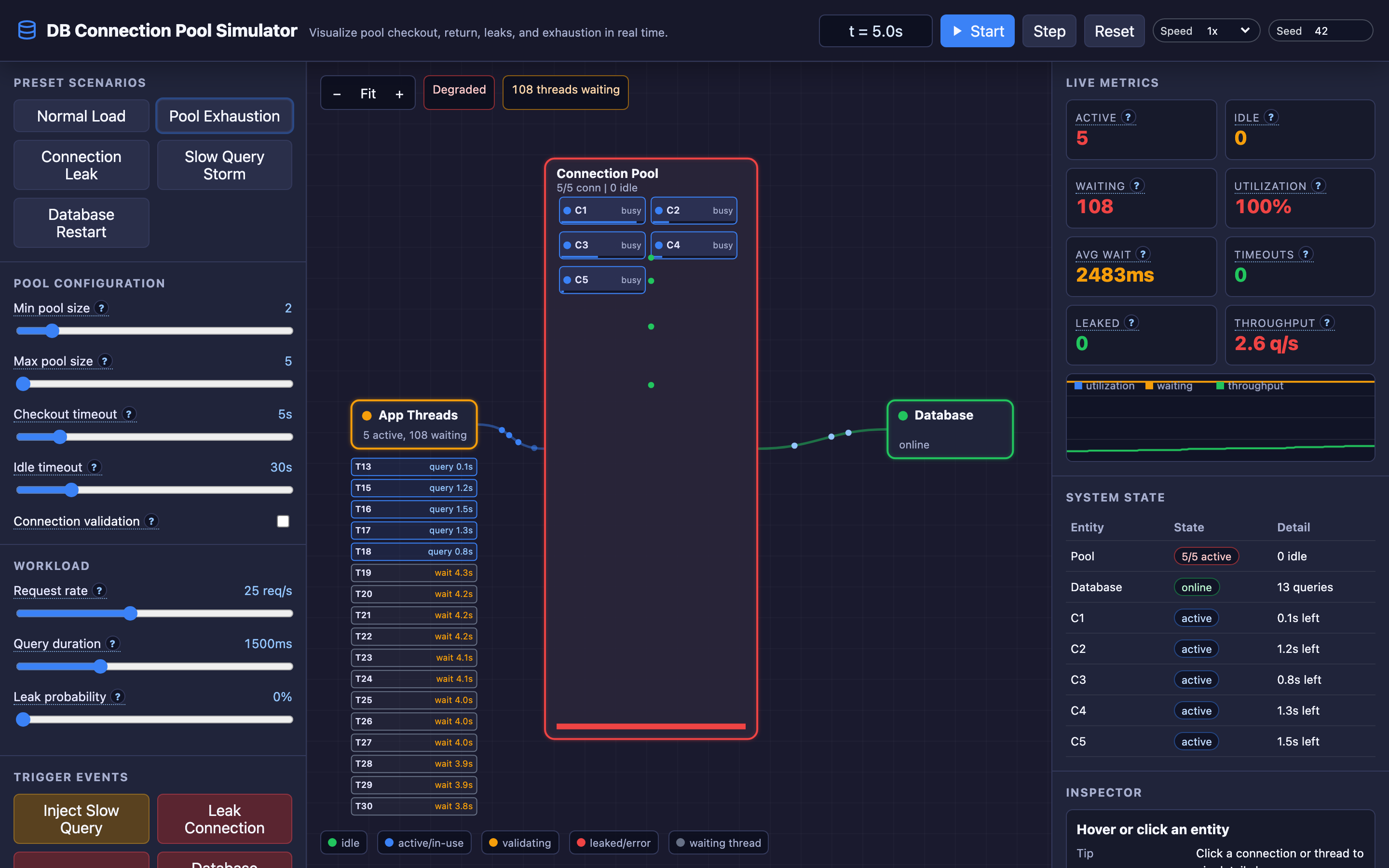
Try it yourself
Connection pool dynamics are hard to reason about in the abstract. Watching threads queue up, connections leak one by one, and slow queries drain the pool in real-time makes the failure modes visceral and memorable.
Try the interactive Connection Pool demo → Start with the “Normal Load” preset, then inject a slow query storm and watch the pool drain. Toggle leak probability to 20% and observe how leaked connections silently degrade capacity over minutes.