Debugging Latency Across Microservices
Learn how distributed tracing, trace IDs, spans, propagation, sampling, and OpenTelemetry reveal latency across microservice calls.
Why this matters
A user clicks “Place Order” and the page spins for 11 seconds before returning an error. The API gateway logged a 504 timeout. But which service caused it? The order API called the inventory service, the payment service, and the notification service. The payment service called the fraud detection service, which called the user profile service, which queried a PostgreSQL database. The inventory service called a warehouse API and a Redis cache. That single user click traversed 8 services and 3 databases.
Your logs show that each service logged the request independently with its own request ID. Correlating these logs requires manually matching timestamps across 8 different log streams — a 45-minute investigation for a single request. At scale (50,000 requests per second across 200 services), logs alone are useless for debugging latency.
Distributed tracing solves this by attaching a single Trace ID to a request at the entry point (the API Gateway) and propagating it through every downstream service call. Each unit of work (an HTTP call, a database query, a cache lookup) is recorded as a Span with a start time, end time, and status. The result is a waterfall Gantt chart showing the complete request timeline — you can instantly see that the fraud detection service’s database query took 9,200ms, causing the 11-second total latency.
My rule of thumb Tracing is most valuable when it preserves causality. Pretty waterfalls are secondary; the real win is knowing which dependency made the request wait.
The mental model
When a request enters through the API Gateway, the tracing SDK generates a unique Trace ID (a 128-bit hex string like 4bf92f3577b34da6a3ce929d0e0e4736) and a root Span. This Trace ID is attached to the request as an HTTP header (traceparent in the W3C Trace Context standard).
As the API Gateway calls downstream services, the Trace ID and the current Span ID are propagated via headers. Each downstream service creates a new child Span, linking it to the parent Span ID. This parent-child relationship builds a tree structure representing the full request path.
traceparent: 00-4bf92f3577b34da6a3ce929d0e0e4736-00f067aa0ba902b7-01
             |  |                                  |                |
             ver trace-id                          parent-span-id  sampled
Each span records: the service name, operation name, start timestamp, duration, status (OK/ERROR), and optional metadata (tags, logs). When a service fails or drops a request, the span is marked as ERROR and the error propagates upward through parent spans.
Completed spans are exported asynchronously to a collector (like the OpenTelemetry Collector), which batches, processes, and forwards them to a backend (Jaeger, Tempo, Datadog). The backend assembles all spans sharing the same Trace ID into a complete waterfall visualization.
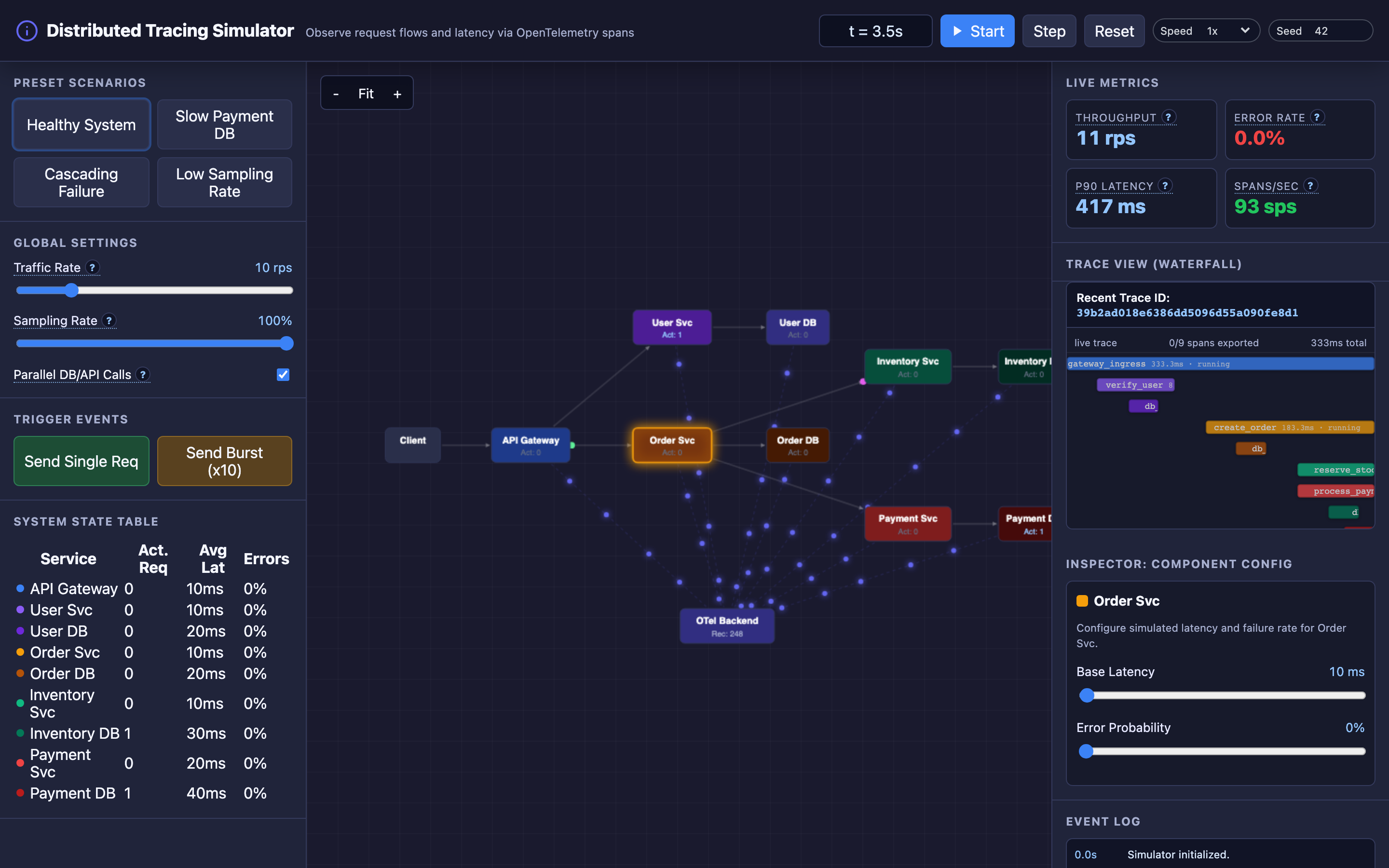
In the TechViz simulator, you can watch spans generate in real-time as requests flow from the API Gateway through services to databases, then see the completed waterfall render in the trace viewer.
Sampling controls which traces are recorded. At 10,000 rps, recording every trace generates massive data volumes — roughly 1TB per day. Head-based sampling (decide at the gateway) drops traces probabilistically. Tail-based sampling (decide after the trace completes) keeps all error and high-latency traces while sampling normal traces.
Decisions that matter
Requests Per Second (RPS)
The overall traffic volume entering the system. Higher RPS generates more traces, increasing collector load and storage costs. At 100 rps with 100% sampling, the TechViz simulator generates 100 trace trees per second, each with 8–12 spans. At 1,000 rps, that’s 10,000 spans per second flowing to the collector.
Trace Sampling Rate (0–100%)
The percentage of traces that are recorded and exported. At 100%, every request is traced — comprehensive but expensive. At 1%, only 1 in 100 requests generates trace data.
The risk: at 1% sampling, a bug that affects 0.1% of requests might never appear in your traces. The TechViz simulator’s “Low Sampling Rate” preset drops sampling to 5% and lets you observe how rarely errors are captured.
# OpenTelemetry Collector configuration
processors:
  probabilistic_sampler:
    sampling_percentage: 10  # Sample 10% of traces

  tail_sampling:
    decision_wait: 10s
    policies:
      - name: errors-policy
        type: status_code
        status_code: {status_codes: [ERROR]}
      - name: latency-policy
        type: latency
        latency: {threshold_ms: 2000}
      - name: probabilistic-policy
        type: probabilistic
        probabilistic: {sampling_percentage: 5}
Parallel vs. Sequential Execution
Toggle whether downstream service calls are made in parallel or sequentially. In parallel mode, the API Gateway calls inventory, payment, and notification simultaneously — the total latency is determined by the slowest call. In sequential mode, latencies add up.
The waterfall visualization makes this strikingly clear: parallel spans appear side-by-side, sequential spans appear stacked.
Per-Service Latency and Error Rate
Click on any node in the TechViz simulator’s canvas to open the Component Inspector. Adjust the base latency (10–5000ms) and error probability (0–100%) for individual services. This lets you model specific bottleneck scenarios: “What happens when the Payment DB latency jumps to 3000ms?”
Where it breaks: Broken Context Propagation
The failure mode: A team migrates the payment service from a monolith to a new Go microservice. The new service handles HTTP requests correctly but doesn’t propagate the traceparent header to its downstream calls (the fraud service and the payment database).
Traces from the API Gateway show the payment service span, but everything downstream appears as separate, disconnected traces with new Trace IDs. The waterfall for a slow request shows the payment service taking 4,500ms, but you can’t see why — the fraud service and database spans are orphaned.
What you will notice:
- Waterfall traces show “missing” spans: the payment service span has no children, despite making downstream calls
- The fraud service generates traces with different Trace IDs than the parent request
- Span count per trace drops suddenly after the payment service migration (from 12 spans to 5 spans per trace)
- The Jaeger “Service Dependencies” graph shows the payment service as a leaf node with no outgoing edges
- Debugging latency in the payment service is impossible — you can see it’s slow but not which downstream call causes it
What I would do: Use OpenTelemetry auto-instrumentation instead of relying on manual propagation. For Go, this means using the otelhttp middleware, which automatically injects and extracts the traceparent header:
import (
    "go.opentelemetry.io/contrib/instrumentation/net/http/otelhttp"
)

// Wrap the HTTP client to auto-propagate context
client := &http.Client{
    Transport: otelhttp.NewTransport(http.DefaultTransport),
}

// Wrap the HTTP server to auto-extract context
handler := otelhttp.NewHandler(mux, "payment-service")
Validate context propagation in CI/CD by running integration tests that assert child spans share the parent’s Trace ID. Add a Grafana dashboard showing spans_per_trace — a sudden drop indicates broken propagation.
Warning Broken context propagation is the #1 cause of useless traces. After any service migration or rewrite, verify that span counts per trace remain consistent before and after the change.
Where it breaks: Collector Overload Dropping Traces
The failure mode: The OpenTelemetry Collector is deployed as a single instance handling span ingestion from 200 microservices at 50,000 spans per second. During a traffic spike (Black Friday), span volume jumps to 200,000 spans per second.
The collector’s internal queue (sending_queue with a default size of 5,000 batches) fills up. Incoming spans are dropped with dropped_spans counter incrementing rapidly. 60% of traces become incomplete — missing 2–5 spans each. The waterfall visualizations are broken for the majority of requests, making the tracing system useless during the exact moment you need it most.
What you will notice:
- Collector metrics:
otelcol_exporter_send_failed_spansandotelcol_processor_dropped_spansspike during traffic peaks - Trace completeness drops: average spans per trace decreases from 12 to 5–7
- Jaeger UI shows partial traces with “missing span” warnings
- Collector CPU and memory utilization: 95%+ on the single instance
- Alert:
rate(otelcol_processor_dropped_spans[5m]) > 0fires during peak hours
What I would do: Deploy the collector as a horizontally scaled Deployment (not a single pod) behind a load balancer. Use the collector’s batch processor to buffer spans and reduce export overhead.
Separate collector tiers: lightweight agents (DaemonSet, one per node) that receive spans from local services and forward to a gateway (Deployment, 3+ replicas) that handles processing and export.
# Kubernetes: Scale the OTel Collector horizontally
apiVersion: apps/v1
kind: Deployment
metadata:
  name: otel-collector-gateway
spec:
  replicas: 5
  template:
    spec:
      containers:
        - name: otel-collector
          resources:
            requests:
              cpu: "2"
              memory: "4Gi"
            limits:
              cpu: "4"
              memory: "8Gi"
Set sending_queue.queue_size to handle 2–3× expected peak volume. Monitor otelcol_exporter_queue_size and scale horizontally when utilization exceeds 60%.
Where it breaks: Sampling Gaps Missing Rare Error Patterns
The failure mode: Head-based probabilistic sampling is set to 5% to manage storage costs. A race condition in the user authentication service causes 0.3% of login requests to fail with a deadlock.
At 10,000 login requests per hour, that’s 30 failures per hour. With 5% sampling, only 1.5 of those failures are captured per hour — and some hours capture zero. The on-call engineer sees sporadic error spans in Jaeger but can’t establish a pattern.
The p90 latency dashboard looks normal because 99.7% of requests succeed. The bug persists for 3 weeks before enough sampled traces accumulate to identify the root cause.
What you will notice:
- Error rate metrics (from logs or metrics, not traces) show 0.3% failures in the auth service
- Trace search for
status=ERROR AND service=authreturns only 1–2 results per hour — not enough to identify a pattern - The error appears randomly with no obvious trigger — impossible to reproduce in staging
- When an error trace is found, it shows a
deadlock detectedspan in the User DB, but with only 1 example, it’s unclear if this is the cause or a symptom - Business metrics (login success rate) show a steady 99.7% — “good enough” to not trigger alerts, but 30 users per hour are impacted
What I would do: Switch from head-based to tail-based sampling. With tail-based sampling, the collector buffers all spans for a configurable window (10–30 seconds), then makes a sampling decision after the trace is complete.
Policy: keep 100% of traces with errors, 100% of traces with latency > 2000ms, and 5% of normal traces. This guarantees every error trace is captured regardless of overall sampling rate:
processors:
  tail_sampling:
    decision_wait: 10s
    num_traces: 100000
    policies:
      - name: keep-all-errors
        type: status_code
        status_code: {status_codes: [ERROR]}
      - name: keep-slow-traces
        type: latency
        latency: {threshold_ms: 2000}
      - name: sample-normal
        type: probabilistic
        probabilistic: {sampling_percentage: 5}
The tradeoff: tail-based sampling requires the collector to buffer complete traces, consuming more memory (the num_traces buffer). Size it to hold 30 seconds of trace volume.
Hint The interactive demo’s “Low Sampling Rate” preset demonstrates how 5% head-based sampling misses rare errors. Compare it to tail-based sampling to see how every error trace is captured regardless of traffic volume.
The tradeoff
| Approach | Pros | Cons |
|---|---|---|
| 100% sampling | Complete visibility, every trace captured | Massive storage cost (~1TB/day at scale), high collector load |
| 1–5% head-based sampling | Low storage cost, minimal overhead | Misses rare errors, no ability to retroactively capture important traces |
| Tail-based sampling | Captures all errors and slow traces, efficient storage | Higher collector memory requirements, 10–30s decision delay |
| Single collector instance | Simple deployment, easy to manage | Single point of failure, can’t handle traffic spikes |
| Horizontally scaled collector | Handles peak traffic, fault-tolerant | More complex deployment, requires load balancing |
| Auto-instrumentation | Zero code changes, consistent propagation | Less control over span attributes, may generate excessive spans |
| Manual instrumentation | Fine-grained control over span creation and attributes | Requires developer discipline, risk of broken propagation |
A practical checklist
Step 1: Verify context propagation end-to-end. Send a test request and check that the Trace ID appears in all downstream services:
curl -H "traceparent: 00-test123-root456-01" https://api.example.com/orders/1
# Then search Jaeger/Tempo for trace_id=test123
Step 2: Check collector health. Monitor key collector metrics:
# Dropped spans (should be 0)
rate(otelcol_processor_dropped_spans[5m])

# Queue utilization (alert at 60%)
otelcol_exporter_queue_size / otelcol_exporter_queue_capacity
Step 3: Analyze trace completeness. Query your trace backend for average spans per trace over time. A sudden drop indicates broken propagation or collector drops:
histogram_quantile(0.5, rate(trace_span_count_bucket[1h]))Step 4: Validate sampling captures errors. Count error traces vs. total error events. If error traces are significantly fewer than error log entries, your sampling is too aggressive for error visibility.
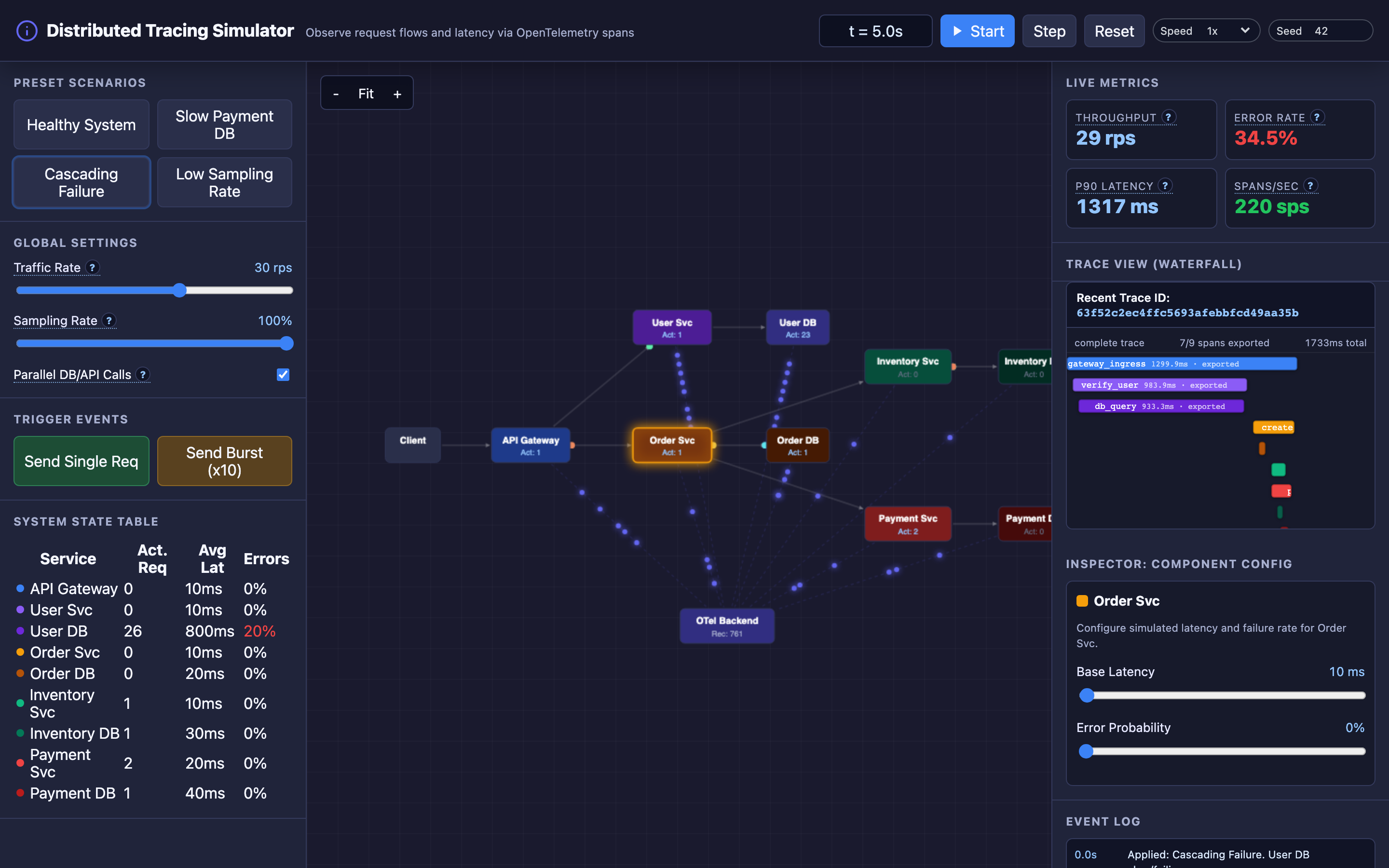
Step 5: Use the TechViz simulator’s presets. The “Slow Payment DB” preset shows how a single slow database creates a cascading waterfall. The “Cascading Failure” preset demonstrates how authentication delays back up the entire system. These visual patterns build the intuition needed for real-world debugging.
Try it yourself
Tracing concepts like context propagation, span hierarchies, and waterfall visualizations are inherently visual. The TechViz simulator lets you inject latency into specific services, toggle parallel vs. sequential execution, adjust sampling rates, and watch the resulting waterfall traces render in real-time.
Try the interactive Distributed Tracing demo → Start with the “Healthy System” preset to see a clean trace, then switch to “Slow Payment DB” and watch the waterfall stretch as a single database query delays the entire request chain.