Why Your Java App Froze for 500ms — Understanding GC Pauses
Learn why garbage collection pauses spike p99 latency, how mark-sweep-compact works, and when G1GC, ZGC, or Shenandoah help.
Why this matters: The Mysterious 500ms Latency Spike That Happens Every 30 Seconds
Your Java API normally handles requests in 8ms at p50 and 25ms at p95. But your p99 latency shows a recurring spike to 500ms — sometimes 800ms — every 20-40 seconds. There’s no corresponding spike in database query time, no network blip, no CPU throttling. The spike appears across all instances simultaneously.
You add more logging. You profile database connections. You check thread pool saturation. Nothing explains it. Then a senior engineer glances at the GC logs and says: “That’s a full GC pause. Your heap is too small.”
The culprit is stop-the-world garbage collection. In languages with managed memory — Java, Go, C#, Python — the runtime periodically pauses all application threads to reclaim unused memory. During this pause, no requests are processed. Every in-flight request stalls.
If the pause takes 500ms and you have 200 concurrent connections, all 200 of them experience a half-second delay simultaneously. For batch processing jobs, a 500ms pause every 30 seconds is irrelevant. For an API serving real-time requests, it’s the difference between meeting your SLO and burning through your error budget.
My rule of thumb GC tuning starts with allocation behavior, not flags. If the app keeps creating garbage faster than the runtime can clean it, no collector setting will save you for long.
The mental model: Mark, Sweep, Compact — and Why Everything Stops
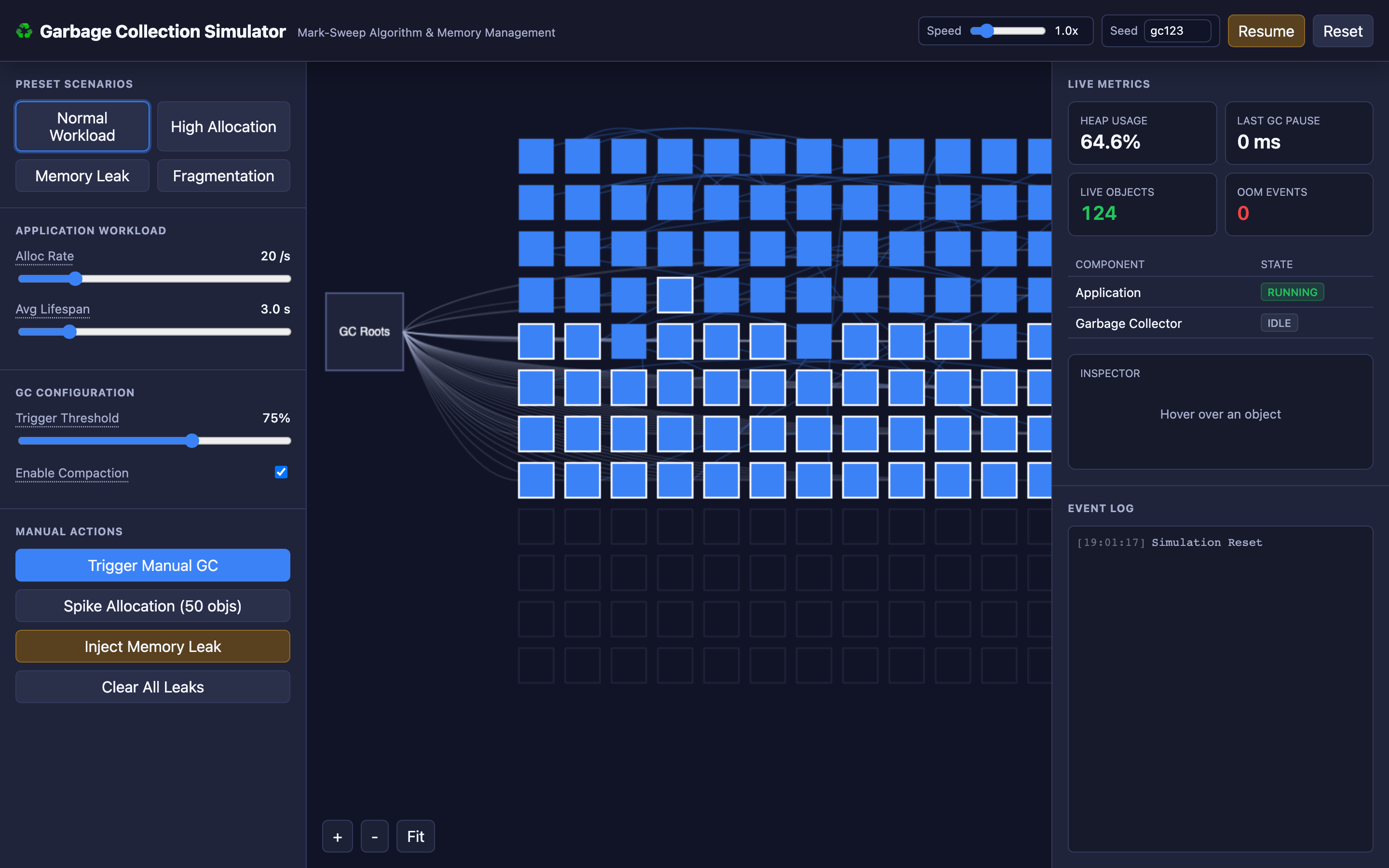
Garbage collection in its simplest form (mark-sweep) operates in three phases that the interactive demo visualizes step by step.
Phase 1: Mark. The GC starts from a set of GC roots — local variables on thread stacks, static class references, JNI handles — and recursively traces every reference. If an object is reachable from any root through any chain of references, it’s marked as “alive.” Everything else is garbage. In the interactive demo, you can watch the GC traverse the object graph, marking reachable objects while unreachable ones remain unmarked.
Phase 2: Sweep. The GC iterates over every slot in the heap. Unmarked objects are freed, and their memory slots are added back to the free list. In the interactive demo, this phase visibly removes the unreachable objects, converting them back to free space.
Phase 3: Compact (optional). After sweeping, live objects may be scattered across the heap with gaps of free memory between them. The compact phase moves surviving objects together into a contiguous block, eliminating fragmentation. This makes future allocations faster (just bump a pointer) but adds time to the GC pause.
// JVM GC logging to diagnose pause times
// Add to JVM args:
// -Xlog:gc*:file=gc.log:time,uptime,level,tags:filecount=5,filesize=100m

// Sample GC log output (G1GC):
// [2.145s] GC(3) Pause Full (G1 Humongous Allocation)
//          512M->248M(1024M) 487.231ms
// [2.145s] GC(3)   Mark:   215.4ms
// [2.145s] GC(3)   Sweep:   89.2ms
// [2.145s] GC(3)   Compact: 182.6ms
The stop-the-world aspect is critical: during mark and compact phases, the JVM must ensure no application thread modifies object references. If a thread creates a new object or moves a reference while the GC is tracing, the GC could miss a live object and free it — causing a segfault.
So the JVM pauses every application thread at a safepoint, runs the GC, then resumes them.
Decisions that matter
| Parameter | Range | Low End Effect | High End Effect |
|---|---|---|---|
| Heap Size (-Xmx) | 256MB – 32GB+ | Frequent GC cycles (every few seconds). Short individual pauses but high CPU overhead from constant collection. | Infrequent GC cycles. But when a full GC does occur, it must scan a massive heap — pauses can exceed 2 seconds on a 32GB heap with G1GC. |
| GC Algorithm | Serial, Parallel, G1GC, ZGC, Shenandoah | Serial: single-threaded GC. Only suitable for small heaps (\<200MB). Long pauses. | ZGC/Shenandoah: concurrent collection with sub-millisecond pauses (\<1ms) even on 16TB heaps. Higher CPU overhead. |
| GC Trigger Threshold | 45% – 90% heap used | Early triggering (45%). GC runs frequently with less work per cycle. Lower pause times but higher overall CPU usage. | Late triggering (90%). GC runs infrequently but each cycle processes more garbage. Risk of “GC overhead limit exceeded” if heap stays near full. |
| Allocation Rate | Low – High | Few objects created per second. GC rarely triggers. Heap stays mostly empty. | Thousands of objects per second. Young generation fills quickly. Minor GCs every few seconds. If objects survive to old gen, major GCs become expensive. |
| Compaction | Disabled / Enabled | No compaction. Faster GC pauses but heap fragments over time. Eventually, allocation fails even with free memory because no contiguous block is large enough. | Compaction enabled. Eliminates fragmentation but adds 30-50% to GC pause duration as live objects are relocated. |
Where it breaks: GC Overhead Limit Exceeded (OutOfMemoryError)
The failure mode: Your application allocates objects faster than the GC can reclaim them. The JVM spends more than 98% of its time in garbage collection while recovering less than 2% of heap space per cycle.
After several consecutive futile GC cycles, the JVM throws java.lang.OutOfMemoryError: GC overhead limit exceeded and the process crashes.
What you will notice:
- Application logs show
java.lang.OutOfMemoryError: GC overhead limit exceeded - GC log shows full GC cycles completing every 1-2 seconds, each recovering only 5-10MB from a 4GB heap
- Prometheus metric
jvm_gc_pause_seconds_sumexceeds 50 seconds per minute (out of 60) - Heap usage graph in Grafana shows a sawtooth pattern that creeps upward, with each trough higher than the last
jcmd <pid> GC.heap_infoshows old generation at 98%+ utilization
What I would do: First, take a heap dump: jcmd <pid> GC.heap_dump /tmp/heapdump.hprof. Analyze it with Eclipse MAT (Memory Analyzer Tool) to find the dominator tree — the objects holding the most retained memory.
Common culprits include unbounded caches (a HashMap that’s never evicted), session objects that aren’t cleaned up, or large result sets loaded entirely into memory.
# Take heap dump from a running JVM
jcmd $(pgrep -f myapp) GC.heap_dump /tmp/heap.hprof

# Analyze with Eclipse MAT CLI
./mat/ParseHeapDump.sh /tmp/heap.hprof \
  org.eclipse.mat.api:suspects \
  org.eclipse.mat.api:top_components
Hint In the interactive demo, you can trigger this by enabling the “Memory Leak” scenario, which allocates objects whose root references are never dropped. Watch the heap fill up as the baseline memory usage continuously inflates.
Where it breaks: Stop-the-World Pauses Spiking p99 Latency
The failure mode: Your service uses G1GC with a 12GB heap. Under normal load, minor GCs take 15ms. But every 2-3 minutes, a mixed GC or full GC triggers, pausing all threads for 400-800ms.
During this pause, the load balancer’s health check times out, the pod is removed from the service mesh, and clients receive 503 errors. When the GC completes and the pod comes back, it gets hammered with queued requests — sometimes triggering another full GC immediately.
What you will notice:
p99latency graph shows periodic spikes to400-800msevery 2-3 minutes- Kubernetes events show
Readiness probe failedentries correlating with GC pauses - GC logs show
Pause Full (G1 Evacuation Pause)events exceeding the-XX:MaxGCPauseMillistarget kubectl describe podshows recent restarts withReason: Unhealthy- Grafana shows the pod being removed and re-added to service endpoints in a cyclic pattern
What I would do: Switch to a low-pause collector. ZGC (-XX:+UseZGC) achieves sub-millisecond pauses regardless of heap size by performing most work concurrently with application threads.
Alternatively, reduce heap size so G1GC has less to scan per cycle — but this increases GC frequency. Also, set Kubernetes readiness probe timeoutSeconds higher than your worst-case GC pause.
Warning Setting
timeoutSecondslower than your worst-case GC pause means Kubernetes will remove the pod from service endpoints during every major GC cycle, creating a cascading failure loop.
# JVM flags for ZGC
JAVA_OPTS: >-
  -XX:+UseZGC
  -XX:+ZGenerational
  -Xmx8g
  -Xms8g
  -Xlog:gc*:file=/var/log/gc.log:time,level,tags

# Kubernetes readiness probe tuned for GC pauses
readinessProbe:
  httpGet:
    path: /health/ready
    port: 8080
  periodSeconds: 10
  timeoutSeconds: 5
  failureThreshold: 3
The interactive demo’s High Allocation scenario demonstrates this: objects are created so fast that the GC triggers frequently, and you can watch the stop-the-world pauses halt all application threads while the collector works.
Where it breaks: Memory Leaks from GC Root Retention
The failure mode: Your application uses a static ConcurrentHashMap as a request cache. Every incoming request adds an entry, but entries are only removed when the caller explicitly calls invalidate().
A code path added three months ago skips the invalidation call on timeout errors. Over weeks, the map accumulates 4 million stale entries. The GC correctly identifies these objects as reachable (they’re referenced from a static field — a GC root) and never collects them.
What you will notice:
- Heap usage after full GC (
jvm_memory_used_bytes{area="heap"}at GC trough) increases by 50MB per day - The application runs fine for days, then suddenly experiences GC overhead errors
jmap -histo:live <pid>shows millions of instances of a specific cache entry class- Eclipse MAT dominator tree shows a single
ConcurrentHashMapretaining 3.2GB of objects - Thread dumps show increasing GC thread activity over time
What I would do: Replace unbounded caches with bounded implementations. Use Caffeine or Guava’s CacheBuilder with maximumSize and expireAfterWrite. For the immediate fix, add a scheduled task that purges entries older than a TTL.
// Before: unbounded cache (memory leak)
private static final Map<String, Result> cache = new ConcurrentHashMap<>();

// After: bounded cache with TTL eviction
private static final Cache<String, Result> cache = Caffeine.newBuilder()
    .maximumSize(100_000)
    .expireAfterWrite(Duration.ofMinutes(15))
    .recordStats()  // Expose hit/miss metrics
    .build();
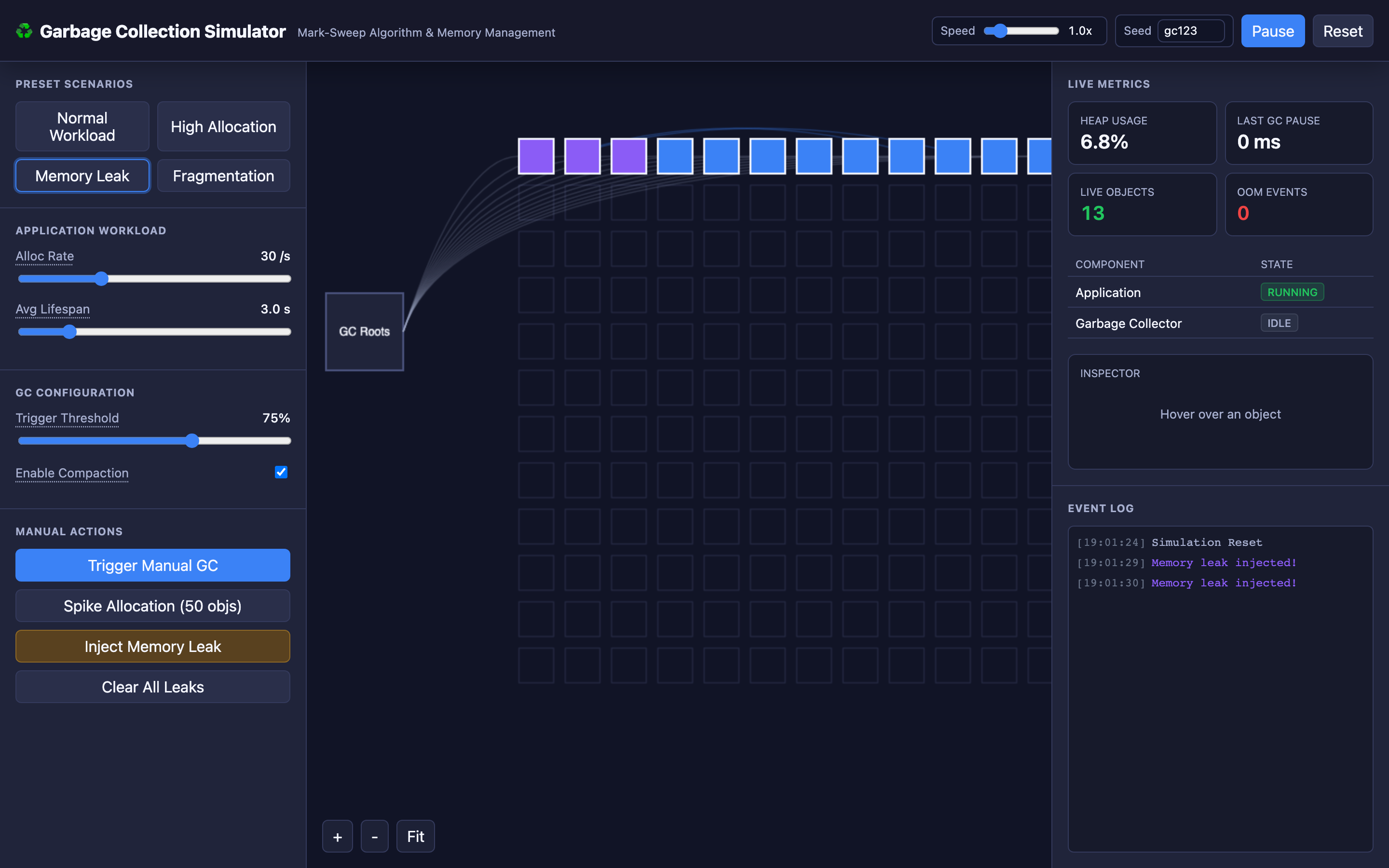
Hint In the interactive demo, trigger the “Memory Leak” control to watch the heap’s baseline memory usage climb continuously — the sawtooth pattern gets higher and higher until OOM.
The tradeoff
| Approach | Pros | Cons |
|---|---|---|
| G1GC (default since Java 9) | Good balance of throughput and pause times. Handles 4-16GB heaps well. Predictable pause targets via -XX:MaxGCPauseMillis. | Full GC pauses can still hit 400-800ms on large heaps. Not suitable for ultra-low-latency requirements (\<10ms p99). |
| ZGC | Sub-millisecond pauses regardless of heap size (tested up to 16TB). Concurrent relocation. | ~5-10% throughput overhead vs G1GC due to read barriers. Higher memory footprint (colored pointers use extra bits). |
| Shenandoah | Sub-millisecond pauses. Available in OpenJDK (not just Oracle). Concurrent compaction. | Similar throughput overhead to ZGC. Not available in all JDK distributions. |
| Large heap (16GB+) | Fewer GC cycles. More room for object allocation spikes. Lower overall GC CPU overhead. | When full GC does trigger, pause can exceed 1 second. Longer to take and analyze heap dumps. |
| Small heap (2GB) | Fast GC cycles (~10ms). Easy to analyze heap dumps. | Frequent GC triggers. Less headroom for traffic spikes. Risk of OOM under load. |
| No compaction | Shorter GC pauses (skip compact phase). | Heap fragmentation over time. Allocation failures despite having free memory. Performance degradation from scattered objects. |
A practical checklist
Step 1: Enable GC logging. Add -Xlog:gc*:file=gc.log:time,uptime,level,tags to your JVM arguments. This costs virtually zero performance overhead and gives you full visibility into GC behavior.
Step 2: Identify your GC pause profile. Parse the GC log to extract pause durations: grep "Pause" gc.log | awk '{print $NF}'. Calculate p50, p95, and p99 pause times. If p99 exceeds your latency SLO, you have a GC problem.
Step 3: Check heap sizing. Run jcmd <pid> GC.heap_info. If old generation utilization after a full GC is consistently above 70%, your heap is too small or you have a memory leak. Increase -Xmx by 50% and re-measure.
Step 4: Analyze heap dumps for leaks. Take a heap dump during high memory usage: jcmd <pid> GC.heap_dump /tmp/heap.hprof. Open in Eclipse MAT. Check the “Leak Suspects” report. Look at the dominator tree for objects with unexpectedly high retained sizes.
Step 5: Choose the right collector. If p99 pause time matters more than throughput (e.g., real-time APIs), switch to ZGC. If throughput matters more (e.g., batch processing), stick with G1GC or Parallel GC. Benchmark both with production-like load before committing.
Try it yourself
The interactive demo makes GC behavior visible. Watch objects get allocated on the heap as colored blocks, see the GC traverse from roots to mark reachable objects, then sweep away the garbage.
Toggle between Normal Workload, High Allocation, Memory Leak, and Fragmentation scenarios. Manually trigger a GC cycle, spike allocations, or inject a memory leak and watch the heap respond in real time.
Try the interactive Garbage Collection demo → Experiment with allocation rates, GC triggers, compaction toggles, and memory leak injections to build deep intuition for how managed runtimes handle memory under pressure.