How Event-Driven Platforms Process Trillions of Messages Per Day
Learn how Kafka handles high-volume event streams with partitions, replication, ISR, consumer groups, backpressure, and durable producers.
Why this matters: Traditional Message Queues Can’t Handle Planet-Scale Event Streams
Your e-commerce platform generates 50,000 events per second: page views, add-to-cart actions, purchases, inventory updates, recommendation signals. A traditional message queue like RabbitMQ handles this fine on a single node — until it doesn’t. At 200,000 events/second, a single broker becomes a bottleneck.
You add more consumers, but the queue itself is the chokepoint. Messages pile up, consumer lag grows to 500,000 messages, and your real-time recommendation engine is serving results based on data that’s 8 minutes stale.
The fundamental problem is that traditional queues process messages through a single ordered stream. You can scale consumers, but you can’t parallelize the queue itself without losing ordering guarantees. If Order #12345 has events “placed → paid → shipped,” those events must be processed in order. But Order #12345’s events don’t need to be ordered relative to Order #67890’s events.
Kafka solves this with partitioned topics. A topic is split into N partitions, each an independent, ordered log. Events are assigned to partitions by key — all events for Order #12345 go to the same partition, preserving per-key order. Different orders go to different partitions, enabling parallel processing. With 64 partitions and 64 consumers, you process 64 streams simultaneously while maintaining per-order consistency.
Practical note Kafka rewards up-front thinking about keys, partitions, and durability. Changing those after traffic arrives is much harder than setting them carefully at the start.
The mental model: Partitions, Replication, ISR, and Consumer Groups
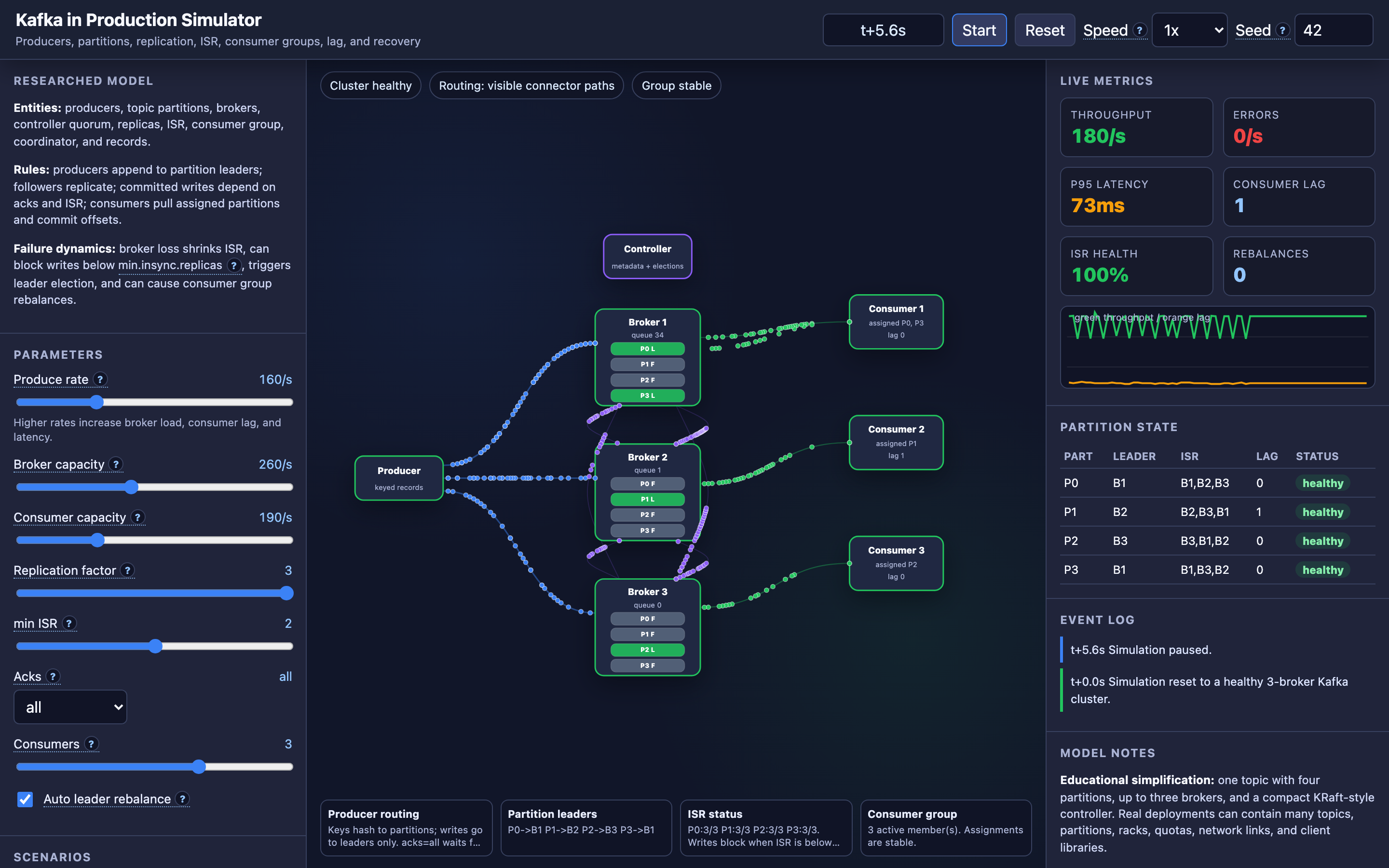
Kafka’s architecture has four components that the interactive demo lets you observe in real time.
Producers append records to partition leaders. Each record has a key and a value. The key determines which partition receives the record: partition = hash(key) % num_partitions. If the key is null, records are distributed round-robin across partitions.
Brokers host partition replicas. Each partition has one leader and N-1 followers. Producers write to the leader. Followers replicate from the leader by fetching new records. When a follower is caught up to within a configurable lag threshold, it joins the In-Sync Replica (ISR) set. The ISR is the set of replicas that are safe to consider “up-to-date.”
The acks setting controls durability guarantees:
acks=0: Producer doesn’t wait for any acknowledgment. Fire-and-forget. Maximum throughput, no durability guarantee.acks=1: Producer waits for the leader to write the record to its local log. If the leader crashes before replication, the message is lost.acks=all: Producer waits for all ISR replicas to write the record. Combined withmin.insync.replicas=2, this guarantees the record survives any single broker failure.
Consumer groups distribute partitions across consumers. Each partition is assigned to exactly one consumer in the group. When a consumer joins or leaves (or crashes), the group rebalances — partitions are reassigned to the remaining consumers. During rebalance, consumption pauses briefly.
# Producer configuration for durability
acks=all
min.insync.replicas=2
retries=2147483647
retry.backoff.ms=100
max.in.flight.requests.per.connection=5
enable.idempotence=true

# Batch tuning for throughput
batch.size=65536
linger.ms=10
compression.type=lz4
buffer.memory=67108864
In the interactive demo, you can watch producers write records to partition leaders, see followers replicate in real time, observe the ISR set expand and contract, and watch consumer groups rebalance when you crash or add consumers.
Decisions that matter
| Parameter | Range | Low End Effect | High End Effect |
|---|---|---|---|
| acks | 0, 1, all | acks=0: No durability. Producer doesn’t retry. Messages lost on any failure. Highest throughput (~2M msg/s). | acks=all: Strongest durability. Producer waits for all ISR replicas. Adds 2-5ms latency per record. Throughput drops to ~200K msg/s. |
| min.insync.replicas | 1 – replication factor | min.insync.replicas=1: Leader alone can acknowledge. If leader crashes after ack, message is lost. | min.insync.replicas=3 (with RF=3): All replicas must be in sync. If any broker goes down, producers are blocked until it recovers. |
| batch.size | 0 – 1MB | batch.size=0: Every record sent individually. High network overhead. Low throughput. Lowest per-message latency. | batch.size=1MB: Records batched before sending. Up to 10x throughput improvement. But individual messages wait up to linger.ms before being sent. |
| linger.ms | 0 – 500ms | linger.ms=0: Send immediately when a record is ready. No artificial delay. Best for low-latency requirements. | linger.ms=100: Wait up to 100ms to fill a batch. Higher throughput via batching but adds 100ms worst-case latency to every message. |
| Produce Rate | 1 – 100K msg/s | Low rate. Brokers idle. No backpressure. Consumer lag near zero. | High rate. Brokers at capacity. If consumers can’t keep up, lag grows. Producer buffer fills up, causing TimeoutException. |
Where it breaks: Partition Hot-Spotting from Bad Keys
The failure mode: Your producer uses customerId as the partition key. 80% of your traffic comes from 50 enterprise customers, each with thousands of transactions per second. The hash of these 50 customer IDs maps to 3 out of 32 partitions.
Those 3 partitions receive 80% of all traffic while the other 29 partitions are nearly empty. The 3 brokers hosting the hot partitions are at 95% disk I/O utilization while the rest are at 10%.
What you will notice:
kafka-consumer-groups.sh --describeshows 3 partitions with lag in the millions while others show lag of 0- Broker metrics show
BytesInPerSecis 10x higher on 3 brokers than on the rest kafka-log-dirs.shshows partition sizes wildly uneven — some partitions at 50GB, others at 2GB- Consumer group rebalancing doesn’t help because the bottleneck is at the partition level, not the consumer level
- Disk I/O alerts fire on the 3 hot brokers while other brokers report normal I/O
What I would do: Analyze key distribution before choosing partition keys. Use a composite key that adds entropy: customerId + "-" + orderId.hashCode() % 8. This spreads a single customer’s events across 8 partitions while keeping individual order events together.
For analytics use cases where strict per-customer ordering isn’t needed, use null keys for round-robin distribution.
Warning Never use a high-cardinality field with skewed distribution (like
customerIdin B2B systems) as your sole partition key. A small number of keys can cause extreme hot-spotting that rebalancing cannot fix.
// Before: hot-spotting on customerId
ProducerRecord<String, String> record = new ProducerRecord<>(
    "orders", customerId, orderJson  // All orders for one customer → same partition
);

// After: composite key for better distribution
String partitionKey = customerId + "-" + (orderId.hashCode() & 0x7FFFFFFF) % 8;
ProducerRecord<String, String> record = new ProducerRecord<>(
    "orders", partitionKey, orderJson  // Orders spread across 8 sub-partitions
);
Where it breaks: Message Loss with acks=0 or acks=1
The failure mode: Your team sets acks=1 for “reasonable durability with good performance.” The producer sends a record. The leader writes it to its local log and acknowledges the producer. 200ms later, the leader broker crashes — the record hasn’t been replicated to any follower yet.
Kafka elects a new leader from the ISR (which doesn’t have the record). The record is permanently lost. No error is logged. The producer received an ACK. The consumer never sees the message.
What you will notice:
- End-to-end message count audit shows a discrepancy: producer sent 10,000,000 records, consumers received 9,999,847
- No producer errors in logs — every record was acknowledged successfully
- The gap correlates with broker failure/restart timestamps in the Kafka broker logs
kafka-run-class.sh kafka.tools.GetOffsetShellshows partition offsets that don’t account for the missing records- Post-mortem reveals the lost records were written to a leader that crashed before replication
What I would do: Set acks=all with min.insync.replicas=2 and replication.factor=3. This ensures every acknowledged record exists on at least 2 brokers before the producer considers it committed. Enable idempotence (enable.idempotence=true) to prevent duplicates from retries.
Hint In the interactive demo, set
acksto different modes and then fail a broker. Withacks=all, watch the producer block until all ISR replicas acknowledge. Withacks=0, watch messages vanish when the broker goes down.
# Producer: maximum durability
acks=all
enable.idempotence=true
max.in.flight.requests.per.connection=5

# Broker/topic: replication safety
replication.factor=3
min.insync.replicas=2
unclean.leader.election.enable=false  # Never elect an out-of-sync replica as leader
Where it breaks: Producer Backpressure Causing Timeouts
The failure mode: Your producer is sending 100,000 records/second to a cluster that can sustain 80,000 records/second. The producer’s internal buffer (buffer.memory=32MB) fills up because records are being produced faster than they can be sent.
When the buffer is full, producer.send() blocks. After max.block.ms (default 60 seconds), it throws TimeoutException. The calling application’s thread pool fills up with blocked threads. HTTP request handlers can’t get threads. The entire API goes down — not because of Kafka, but because the producer’s backpressure propagated to the application layer.
What you will notice:
- Application logs show
org.apache.kafka.common.errors.TimeoutException: Failed to allocate memory within the configured max blocking time - Thread dump shows dozens of threads blocked on
KafkaProducer.send()→BufferPool.allocate() - Producer metric
buffer-available-bytesdrops to 0 - Producer metric
record-queue-time-avgincreases from1msto30000ms+ - API response times spike because all threads are blocked waiting for buffer space
kafka-consumer-groups.sh --describeshows consumer lag growing rapidly
What I would do: Increase buffer.memory to handle burst capacity (e.g., 128MB). Tune batch.size and linger.ms to improve throughput via batching.
Add producer-side rate limiting or circuit breaking so the application fails fast instead of blocking. Monitor buffer-available-bytes and alert when it drops below 20% of total buffer.
Hint The interactive demo lets you push the produce rate beyond broker capacity. Watch consumer lag grow and observe how backpressure builds when brokers can’t keep up.
// Producer with backpressure handling
Properties props = new Properties();
props.put("buffer.memory", 134217728);     // 128MB buffer
props.put("batch.size", 65536);             // 64KB batches
props.put("linger.ms", 20);                 // Wait 20ms to fill batches
props.put("max.block.ms", 5000);            // Fail fast after 5s, not 60s
props.put("compression.type", "lz4");       // Compress to reduce network I/O

// In application code — handle backpressure gracefully
try {
    producer.send(record, (metadata, exception) -> {
        if (exception != null) {
            metrics.increment("kafka.send.failure");
            deadLetterQueue.enqueue(record);  // Don't lose the message
        }
    });
} catch (TimeoutException e) {
    // Buffer full — shed load rather than blocking
    metrics.increment("kafka.backpressure.timeout");
    return Response.status(503).entity("Service temporarily unavailable").build();
}
The tradeoff
| Approach | Pros | Cons |
|---|---|---|
| acks=all + min.insync=2 | Strongest durability. Survives any single broker failure without data loss. | 2-5ms added latency per record. Producers blocked if ISR drops below minimum. |
| acks=1 | Low latency (~1ms). Good throughput. Simple configuration. | Messages can be lost if leader crashes before replication. Silent data loss — no error reported. |
| acks=0 | Maximum throughput (~2M msg/s). Zero producer-side latency. | No delivery guarantee whatsoever. Suitable only for metrics/logging where loss is acceptable. |
| Large batch.size + high linger.ms | Up to 10x throughput via batching and compression. Lower network overhead. | Adds latency (up to linger.ms) to every message. Higher memory usage for buffering. |
| Small batch.size + linger.ms=0 | Lowest per-message latency. Records sent immediately. | High network overhead (many small requests). Lower overall throughput. |
| Many partitions (128+) | High parallelism. More consumers can process concurrently. | More metadata overhead. Longer leader elections during broker failures. Higher end-to-end latency. |
| Few partitions (4-8) | Simple operations. Fast leader elections. Lower metadata overhead. | Limited parallelism. Fewer consumers can work concurrently. Risk of hot-spotting. |
A practical checklist
Step 1: Analyze partition distribution. Run kafka-consumer-groups.sh --bootstrap-server localhost:9092 --describe --group my-consumer-group. Check the LAG column for each partition. If some partitions show 10x more lag than others, you have a key distribution problem.
Step 2: Monitor ISR health. Set up a Prometheus alert on kafka_server_replicamanager_isrshrinks_total. ISR shrinks indicate followers falling behind. If min.insync.replicas isn’t met, producers will be blocked.
# Prometheus alert for ISR shrinks
- alert: KafkaISRShrink
  expr: rate(kafka_server_replicamanager_isrshrinks_total[5m]) > 0
  for: 5m
  labels:
    severity: warning
  annotations:
    summary: "ISR shrinking — followers falling behind"
Step 3: Tune producer batching. Start with batch.size=64KB and linger.ms=10. Monitor records-per-request-avg. If it’s close to 1, increase linger.ms. If it’s close to batch.size/avg_record_size, the batch is filling up naturally and you can reduce linger.ms.
Step 4: Set up consumer lag monitoring. Use Burrow or Prometheus to track consumer group lag. Alert when lag exceeds a threshold relative to your produce rate (e.g., lag > 5 minutes of production). Lag growth indicates consumers can’t keep up.
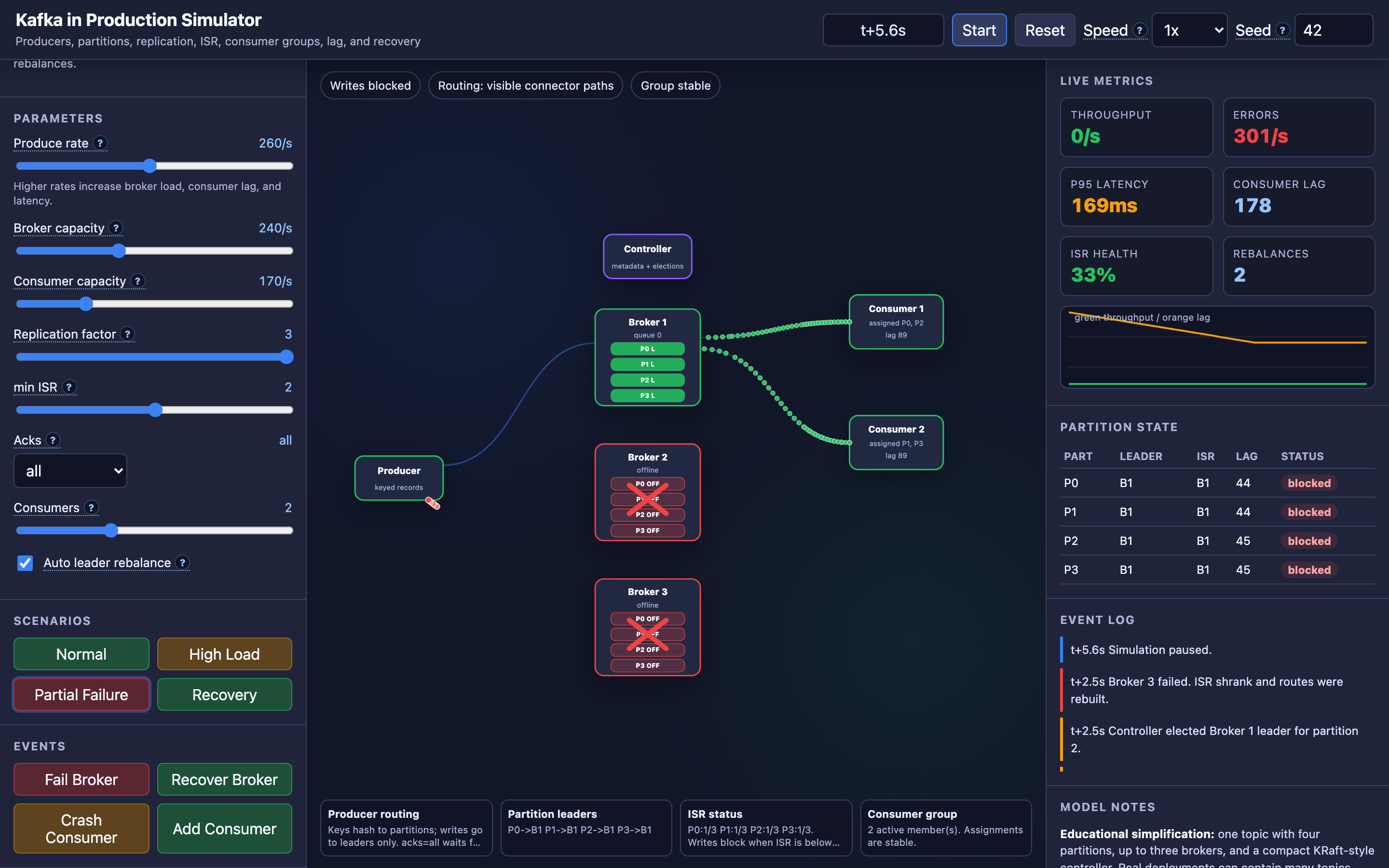
Step 5: Test broker failure recovery. In the interactive demo, fail a broker and watch leader election, ISR adjustment, and consumer group rebalance happen in real time. Measure how long it takes for the cluster to fully recover and resume producing/consuming at full throughput.
Try it yourself
The interactive demo lets you operate a live Kafka cluster. Tune produce rate, replication factor, min ISR, and acks mode. Fail individual brokers and watch leader elections propagate in real time — partitions that lived on the failed broker get new leaders elected from the remaining ISR.
Crash consumers and observe the consumer group rebalance, redistributing partitions to surviving consumers. Push the produce rate beyond broker capacity and watch consumer lag grow.
Try the interactive Kafka Production demo → Experiment with broker failures, consumer crashes, acks modes, and high-load scenarios to understand how Kafka maintains durability and throughput at scale.