Why Background Jobs Fail Silently
Learn how message queues handle background work, poison messages, dead letter queues, backpressure, acknowledgments, and retries.
Why this matters: Fire-and-Forget Is a Lie
Your e-commerce platform processes orders asynchronously. The checkout service writes an order to the database and kicks off a background job to send a confirmation email, charge the payment, and update inventory. On a normal day, 99.8% of these jobs complete.
On Black Friday, the email service goes down for 12 minutes. During that window, 4,300 confirmation emails are lost forever. Customers see “Order confirmed” on screen but never receive emails. Some dispute the charges because they have no receipt.
The root cause isn’t the email service crashing — services crash all the time. The root cause is that the background job system used fire-and-forget semantics: it dispatched the email task and immediately moved on, never tracking whether it succeeded or failed. When the email service was down, those 4,300 tasks vanished into a void. No retry. No alerting. No record they ever existed.
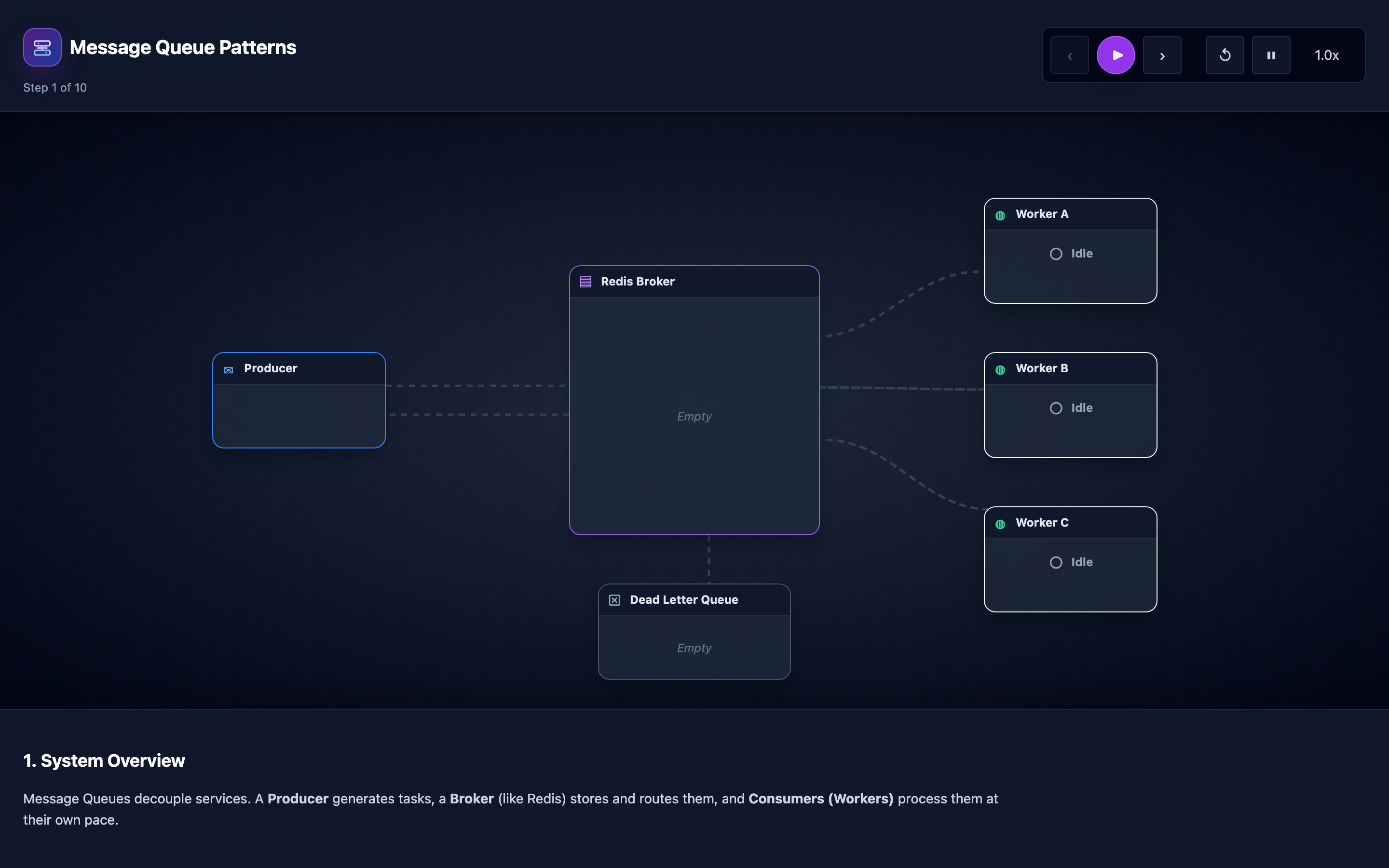
Message queues solve this by decoupling producers from consumers with guaranteed delivery semantics. Instead of calling the email service directly, the checkout service publishes a message to a queue. The email consumer pulls messages, processes them, and explicitly acknowledges completion.
If the consumer crashes mid-processing, the message stays in the queue and gets redelivered. The interactive visualization shows this flow animated as envelopes traveling through the broker, making the difference between fire-and-forget and guaranteed delivery immediately visible.
My rule of thumb Queues move failure in time. They do not remove it. Design for poison messages, retries, and backpressure before the queue is full.
The mental model: Three Messaging Patterns
Simple Queue (Point-to-Point): The producer pushes messages with LPUSH and the consumer blocks with BRPOP, pulling messages in FIFO order. Each message is delivered to exactly one consumer. This is the competing-consumers pattern — if you have 3 consumers, each message goes to only one of them, naturally load-balancing the work.
# Producer pushes a message
redis-cli LPUSH order_queue '{"orderId":"12345","action":"send_email"}'

# Consumer blocks waiting for messages
redis-cli BRPOP order_queue 0
# Returns the message when one arrives
Pub/Sub (Fan-Out): The publisher sends a message to a channel, and ALL active subscribers receive a copy. This is ideal for event broadcasting — when an order is placed, the email service, inventory service, and analytics service all need to know. But pub/sub in Redis has no persistence: if a subscriber is offline when the message is published, that message is lost.
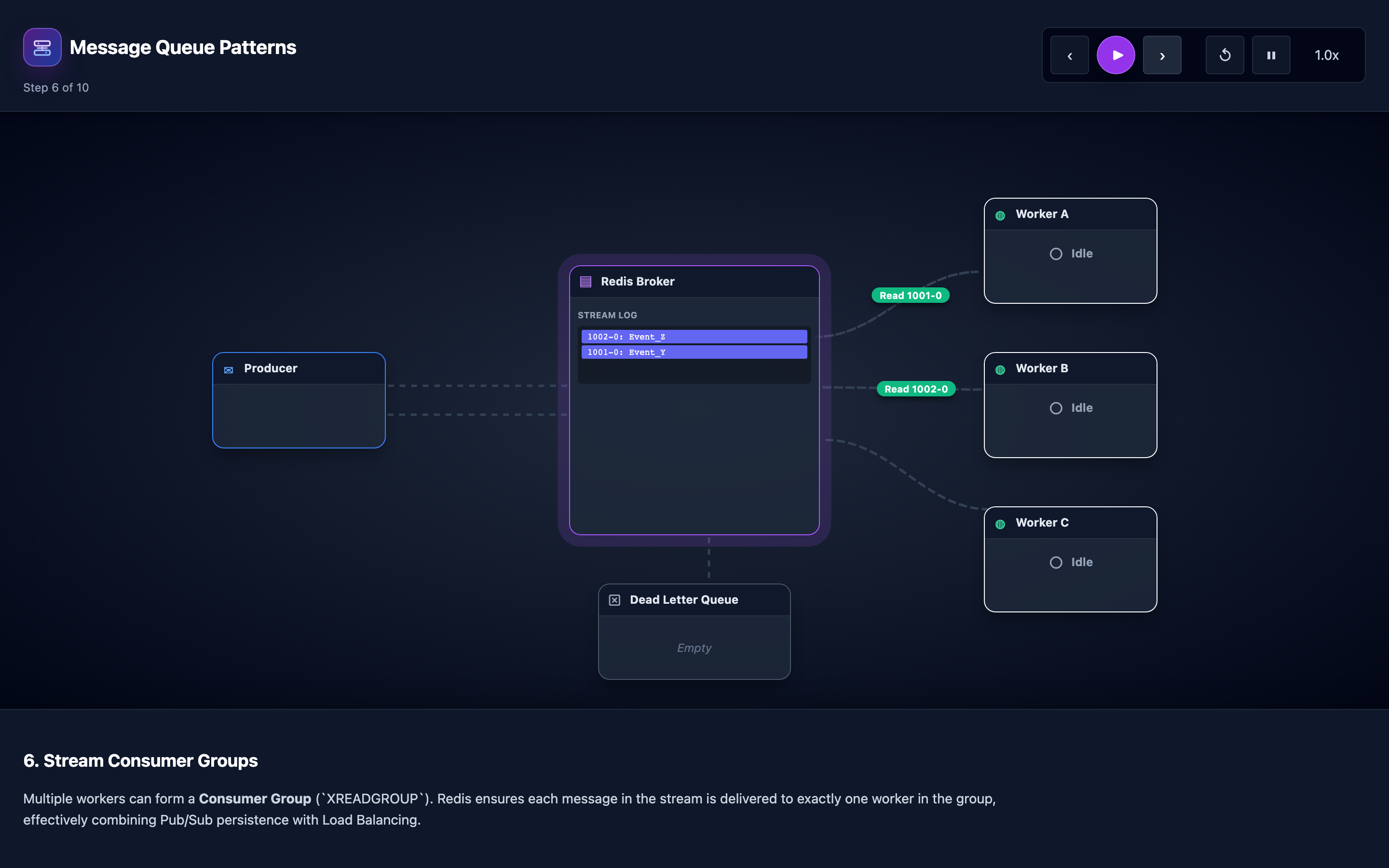
Redis Streams: The most robust pattern. XADD appends messages to an append-only log with auto-generated IDs. Consumer groups assign different messages to each consumer for load balancing.
XACK confirms processing — unacknowledged messages stay in the pending list and can be reclaimed and retried. Messages that fail repeatedly are routed to a dead letter queue (DLQ). The visualization steps through all 10 stages from basic queues to stream consumer groups with animated message flow.
# Producer appends to stream
redis-cli XADD orders * orderId 12345 action send_email

# Create consumer group
redis-cli XGROUP CREATE orders email-consumers 0

# Consumer reads from group
redis-cli XREADGROUP GROUP email-consumers consumer-1 COUNT 1 BLOCK 5000 STREAMS orders >

# Acknowledge after successful processing
redis-cli XACK orders email-consumers 1685000000000-0
Hint The visualization’s Stage 7 shows Redis Streams with consumer groups in action. Watch how
XACKmechanics work and what happens when a consumer crashes mid-processing — the message stays pending until another consumer reclaims it.
Decisions that matter
-
Consumer Group Size (1–10 consumers): More consumers process messages in parallel. With 1 consumer processing 500 msg/s, a 10-consumer group handles 5,000 msg/s. But adding consumers beyond the partition count (for Kafka) or beyond your throughput needs wastes resources. The interactive visualization shows competing consumers pulling from the same group.
-
Acknowledgment Mode (
auto-ackvsmanual-ack): Auto-ack marks messages as processed the moment they’re delivered. Manual ack waits for the consumer to explicitly callXACK. Auto-ack is faster but loses messages if the consumer crashes after receiving but before processing. Manual ack is safer but requires idempotent consumers for redelivery. -
Pending Message Timeout (10–300 seconds): How long a message can sit in the pending list before it’s eligible for reclaim by another consumer. Set too short (10s), and slow-processing messages get stolen and processed twice. Set too long (300s), and messages from crashed consumers wait 5 minutes before anyone retries them.
-
Dead Letter Queue Threshold (3–10 retries): After how many failed processing attempts a message is moved to the DLQ instead of being retried again. At 3 retries, poison pills are quarantined quickly but legitimate transient failures might not get enough chances. At 10 retries, transient failures almost always succeed but poison pills loop for a long time.
-
Max Queue Depth (1,000–1,000,000 messages): The maximum number of messages allowed in the queue before the producer is back-pressured. Without a limit, a producer outpacing consumers fills memory until Redis OOM-kills. With a strict limit, producers block or fail when the queue is full, preventing memory exhaustion.
Where it breaks: Poison Pill Messages Crashing Consumers in a Loop
The failure mode: A producer publishes a message with malformed JSON — a missing closing brace in the payload. Consumer 1 picks it up, tries to deserialize it, throws JsonParseException, and the message returns to the queue unacknowledged.
Consumer 2 picks it up, same crash. Consumer 3, same crash. The poison pill message cycles through all consumers indefinitely. Every consumer spends 80% of its time crashing and restarting on this one message, while 50,000 valid messages pile up behind it.
What you will notice: Consumer restart count spikes — Kubernetes shows CrashLoopBackOff on all consumer pods. The pending entry list (XPENDING) shows one message ID with a delivery count of 50+ and incrementing.
Queue depth grows despite consumers being “running.” CPU and memory graphs show sawtooth patterns as consumers repeatedly start, crash, and restart.
# Identify the poison pill
redis-cli XPENDING orders email-consumers - + 10
# Look for entries with high delivery counts:
# 1) "1685000000000-0"
# 2) "consumer-1"
# 3) (integer) 300000  <- 5 min since last delivery
# 4) (integer) 47      <- delivered 47 times = POISON PILL

# Inspect the bad message
redis-cli XRANGE orders 1685000000000-0 1685000000000-0
What I would do: Implement a dead letter queue. After 3–5 failed processing attempts, move the message to a separate DLQ stream instead of requeuing it. Wrap consumer processing in a try/catch that increments a retry counter.
Log the full message payload to the DLQ for later investigation. Set up Prometheus alerts on redis_stream_pending_delivery_count > 5 to catch poison pills within minutes.
Warning Without a DLQ threshold, a single malformed message can effectively halt your entire consumer fleet. Always set a maximum retry count — 3–5 is a safe default for most workloads.
Where it breaks: Consumer Starvation From Producer Flood
The failure mode: Your marketing team sends a push notification to 2 million users at 10:00 AM. Each notification generates an analytics event published to the events stream at 40,000 msg/s. Your consumer group has 4 consumers, each processing 800 msg/s — a total capacity of 3,200 msg/s.
The queue grows by 36,800 messages per second. Within 3 minutes, the queue has 6.6 million pending messages. Redis memory usage jumps from 2 GB to 11 GB. The analytics consumers are now 34 minutes behind real-time, and other Redis operations (caching, sessions) slow down because Redis is single-threaded.
What you will notice: XLEN events shows the stream length growing rapidly. INFO memory shows used_memory_human climbing above your provisioned limit.
SLOWLOG GET shows increasing latency on unrelated Redis commands — the analytics flood is starving other workloads. Consumer lag metric redis_stream_consumer_lag shows millions of unprocessed messages.
# Check queue depth
redis-cli XLEN events
# Output: 6600000 <- 6.6 million backlogged

# Check memory impact
redis-cli INFO memory | grep used_memory_human
# Output: used_memory_human:11.2G

# Check consumer lag
redis-cli XINFO GROUPS events
# consumer-lag shows millions
What I would do: Implement consumer autoscaling. Use KEDA (Kubernetes Event-Driven Autoscaler) to scale consumer pods based on stream pending count. When pending messages exceed 10,000, scale from 4 to 20 consumers.
Add MAXLEN to XADD to cap stream length and prevent unbounded memory growth. For predictable spikes (marketing campaigns), pre-scale consumers before the event.
# KEDA ScaledObject for Redis Streams
apiVersion: keda.sh/v1alpha1
kind: ScaledObject
metadata:
  name: analytics-consumer
spec:
  scaleTargetRef:
    name: analytics-consumer
  minReplicaCount: 4
  maxReplicaCount: 40
  triggers:
    - type: redis-streams
      metadata:
        address: redis:6379
        stream: events
        consumerGroup: analytics
        pendingEntriesCount: "10000"
Where it breaks: Message Loss From Premature Acknowledgment
The failure mode: A developer optimizes consumer throughput by calling XACK immediately after receiving the message, before processing it. The consumer fetches a payment-processing message, acknowledges it, then calls the payment gateway API. The payment gateway returns a 500 error.
The consumer logs the error and moves on. But the message is already acknowledged — it will never be retried. The customer’s order shows “processing” forever. Over a week, 230 payments fail silently, totaling $47,000 in lost revenue.
What you will notice: No alerts fire because there are no pending messages — everything is acknowledged. The DLQ is empty because messages never failed from Redis’s perspective.
The only signal is in application logs: Payment failed for order 12345, gateway returned 500. Business metrics show a discrepancy: 230 orders in “processing” state with no corresponding payment records. Customer support tickets increase with “I was charged but no confirmation” complaints.
# WRONG: Acknowledge before processing
message = consumer.read_group(group, consumer_id, stream, count=1)
consumer.xack(stream, group, message.id)  # ACK before processing!
result = payment_gateway.charge(message.data)  # This can fail
if not result.success:
    logger.error(f"Payment failed for {message.data['orderId']}")
    # Message is gone forever — XACK already sent

# CORRECT: Acknowledge after processing
message = consumer.read_group(group, consumer_id, stream, count=1)
result = payment_gateway.charge(message.data)
if result.success:
    consumer.xack(stream, group, message.id)  # ACK only on success
else:
    # Message stays pending, will be retried automatically
    logger.warning(f"Payment retry pending for {message.data['orderId']}")
What I would do: Always acknowledge after successful processing, never before. This is the post-processing acknowledgment pattern. If the consumer crashes after processing but before acknowledging, the message will be redelivered — which means your processing logic must be idempotent.
Use a unique orderId as an idempotency key: before processing, check if the payment was already made. If yes, just ACK without reprocessing.
Hint The interactive demo’s “Premature ACK” scenario demonstrates this exact failure. Toggle between auto-ack and manual-ack modes to see how message durability changes.
The tradeoff
| Approach | Pros | Cons |
|---|---|---|
| At-least-once delivery (manual ACK) | No message loss, safe default | Requires idempotent consumers, possible duplicate processing |
| At-most-once delivery (auto ACK) | Simplest, highest throughput | Messages lost if consumer crashes after receive |
| Exactly-once delivery (transactions) | Ideal semantics, no duplicates or loss | Complex, slow (2-phase commit), limited platform support |
| Simple Queue (LPUSH/BRPOP) | Minimal setup, FIFO, exactly-one delivery | No persistence, no consumer groups, no retry |
| Pub/Sub (fan-out) | All subscribers receive every message | No persistence — offline subscribers miss messages |
| Redis Streams (XADD/XREADGROUP) | Persistent, consumer groups, ACK, DLQ | More complex setup, higher memory usage |
| Single consumer | Simple, no ordering concerns | Throughput limited to one worker’s capacity |
| Consumer group (N consumers) | Linear throughput scaling | Ordering only within partition, more pods to manage |
A practical checklist
Step 1: Identify the bottleneck. Check if the problem is the producer outpacing consumers (growing queue depth) or consumers failing on specific messages (high retry counts). Run XPENDING to see pending message counts and delivery attempts.
# Check overall stream health
redis-cli XINFO STREAM orders
redis-cli XINFO GROUPS orders
redis-cli XPENDING orders email-consumers - + 10
Step 2: Quarantine poison pills. If any message has a delivery count above 5, it’s a poison pill. Move it to a DLQ stream manually: XCLAIM it to a cleanup consumer, copy it to the DLQ stream, then XACK it from the main stream.
Step 3: Scale consumers to match throughput. Calculate your producer rate with XLEN over time. If producers push 5,000 msg/s and each consumer processes 500 msg/s, you need at least 10 consumers. Add 50% headroom for burst tolerance.
Step 4: Set stream length limits. Add MAXLEN ~ 1000000 to your XADD calls to cap stream length. The ~ makes the trim approximate, which is significantly faster than exact trimming.
Step 5: Monitor and alert. Set up Prometheus metrics for: stream length (XLEN), pending message count, consumer lag, and delivery count distributions. Alert when consumer lag exceeds 60 seconds of traffic or any message’s delivery count exceeds your DLQ threshold.
Try it yourself
The visualization animates messages as envelopes flowing from producers through the Redis broker to consumers. Step through 10 stages: from basic LPUSH/BRPOP queues, through pub/sub fan-out, to Redis Streams with consumer groups and acknowledgment.
Watch what happens when a consumer crashes mid-processing — the message stays pending until another consumer reclaims it.
Try the interactive Message Queue Patterns visualization — compare fan-out vs competing consumer delivery, watch ACK mechanics, and see how dead letter queues quarantine poison pills.