API Rate Limiting Without Blocking Good Users
Learn how token bucket rate limiting handles API abuse, burst traffic, Redis counter contention, IP rotation, and legitimate client spikes.
Why this matters: One Bad Actor Can Take Down Your Entire API
Your public API serves 3,000 legitimate requests per second from 500 different clients. At 2:14 PM, a single client starts sending 50,000 requests per second — a misconfigured integration test running against production.
Without rate limiting, those 50,000 req/s compete with legitimate traffic for database connections, CPU cycles, and memory. Your API’s p99 latency jumps from 120ms to 8,400ms. Error rates spike to 34%. All 500 clients suffer because of one.
The challenge isn’t just blocking abusers. It’s distinguishing between a DDoS attack, a legitimate traffic spike (your app got featured on Hacker News), and a misbehaving client script. Blocking too aggressively means legitimate users see 429 Too Many Requests during normal usage. Blocking too loosely means a single bad actor can degrade the experience for everyone.
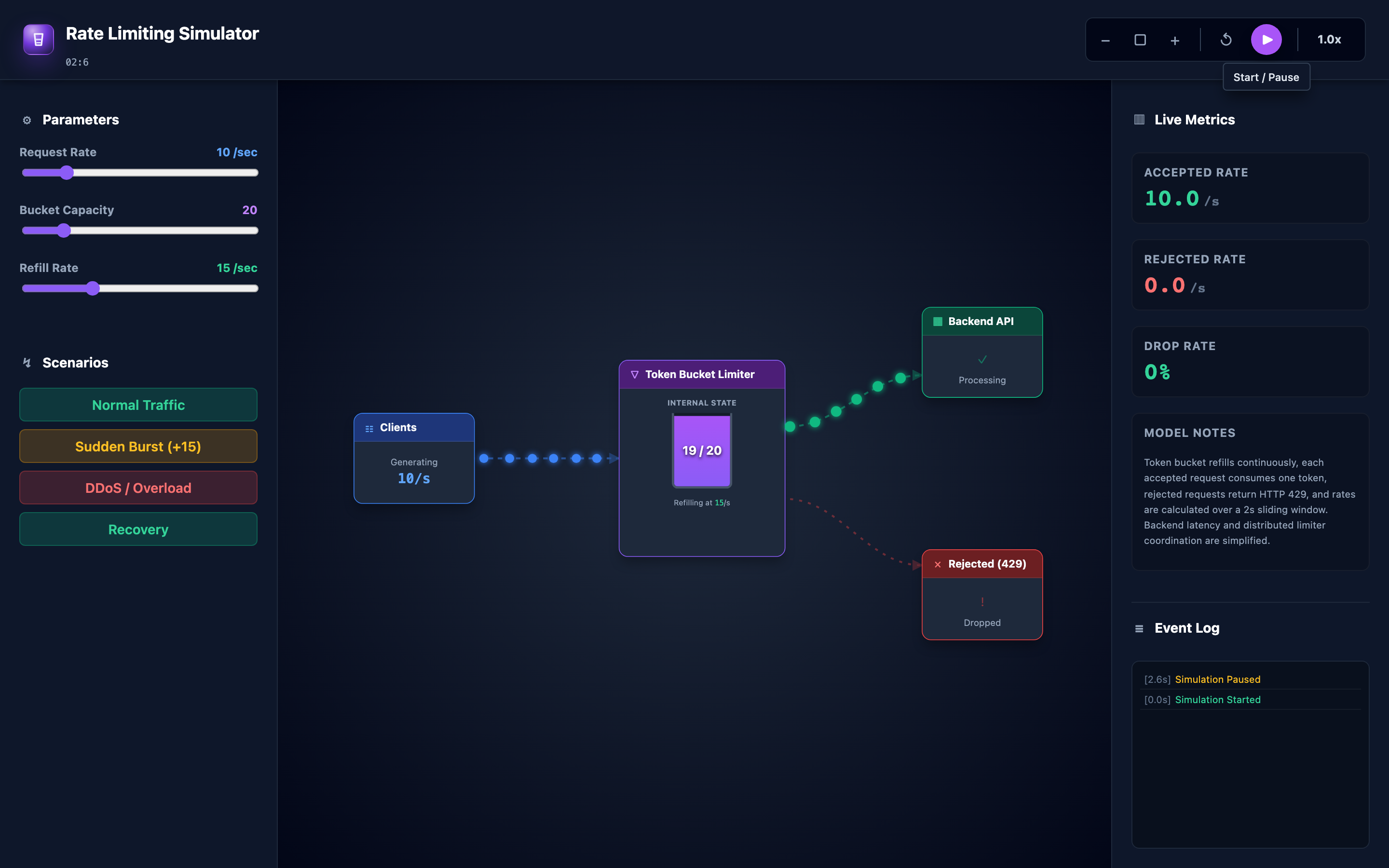
The interactive demo lets you experiment with this exact tension. Adjust request rate, bucket capacity, and refill rate with sliders. Trigger a Sudden Burst or Overload/DDoS scenario and watch live metrics: accepted/sec, rejected/sec, drop rate, and token count. You can see how the token bucket drains under pressure and how quickly it recovers when traffic normalizes.
Practical note Rate limits should protect the shared system without punishing normal bursts. That usually means modeling real client behavior, not just picking a neat number.
The mental model: Token Bucket Rate Limiting
The token bucket algorithm is the most widely deployed rate limiting strategy in production APIs (used by AWS API Gateway, Stripe, GitHub API, and Google Cloud Endpoints). It works like a bucket that fills with tokens at a constant rate:
Refill: Tokens are added to the bucket at a fixed refill rate — say, 100 tokens per second. The bucket has a maximum capacity — say, 200 tokens. If the bucket is already full, new tokens are discarded.
Consume: Each incoming request must take one token from the bucket. If a token is available, the request is accepted and the token is removed. If the bucket is empty, the request is rejected with a 429 Too Many Requests response.
Burst tolerance: The key insight is that the bucket’s capacity determines burst tolerance. A bucket with 200 tokens and a 100 token/s refill rate can handle a burst of 200 requests instantly, then sustain 100 req/s indefinitely. This allows legitimate short bursts (page loads that fire 20 API calls simultaneously) while enforcing a long-term rate limit.
class TokenBucket:
    def __init__(self, capacity: int, refill_rate: float):
        self.capacity = capacity
        self.tokens = capacity  # Start full
        self.refill_rate = refill_rate  # tokens per second
        self.last_refill = time.time()

    def allow_request(self) -> bool:
        self._refill()
        if self.tokens >= 1:
            self.tokens -= 1
            return True  # 200 OK
        return False  # 429 Too Many Requests

    def _refill(self):
        now = time.time()
        elapsed = now - self.last_refill
        self.tokens = min(self.capacity, self.tokens + elapsed * self.refill_rate)
        self.last_refill = now
The interactive demo visualizes this in real time. Set the request rate to 50 req/s, bucket capacity to 100, and refill rate to 100/s — you’ll see zero rejections because refill outpaces consumption. Now hit the “Sudden Burst” button and watch the bucket drain in seconds, with rejected requests spiking until the burst subsides.
Hint Start the interactive demo with a request rate of 50, bucket capacity of 100, and refill rate of 100. Then hit “Sudden Burst” — watch tokens drain in real time and see how the rejection rate spikes and recovers.
Decisions that matter
-
Request Rate (1–500 req/s): The simulated incoming traffic rate. At low rates (10–50 req/s), the bucket stays nearly full. At rates exceeding the refill rate, the bucket drains steadily. At extreme rates (500 req/s with 100/s refill), the bucket empties almost instantly and the rejection rate approaches 80%. The interactive demo’s slider lets you sweep through this entire range.
-
Bucket Capacity (10–500 tokens): Determines maximum burst tolerance. A capacity of 10 means only 10 requests can arrive simultaneously before throttling kicks in. A capacity of 500 allows a massive burst of 500 requests followed by sustained throttling at the refill rate. Higher capacity is more forgiving for bursty workloads but offers less protection against sustained abuse. The interactive demo shows the token count draining and refilling in real time.
-
Refill Rate (1–200 tokens/sec): The sustained request rate your API is willing to accept long-term. This should match your backend’s actual capacity divided by the number of clients. If your API handles 10,000 req/s total and you have 100 clients, set per-client refill to 100/s. The interactive demo visualizes how quickly tokens replenish after a burst.
-
Burst Scenario Trigger: The interactive demo’s “Sudden Burst” button sends a spike of traffic that drains the bucket rapidly. Watch accepted/sec stay high initially (while tokens last), then drop sharply as the bucket empties. Rejected/sec mirrors this — low during the initial burst, then spiking.
-
Overload/DDoS Scenario Trigger: Simulates sustained high-volume traffic. Unlike a burst, the overload scenario doesn’t subside. The bucket empties and stays empty, with the rejection rate stabilizing at a high percentage. Only when you reduce the request rate does the bucket begin recovering.
Where it breaks: Distributed Lock Contention on Redis Counters
The failure mode: You implement rate limiting across 20 API gateway instances using a shared Redis counter. Each request calls INCR key and EXPIRE key 60 to track per-minute request counts.
At 50,000 req/s aggregate, Redis processes 50,000 INCR operations per second on hot keys. Redis is single-threaded — these operations serialize. p99 latency on the INCR command climbs from 0.1ms to 12ms.
Since rate limiting happens on the critical path of every API request, this adds 12ms to every response. Your API’s total p99 latency increases from 120ms to 132ms — a 10% regression from the rate limiter itself.
What you will notice: Redis SLOWLOG shows INCR commands taking >10ms. redis-cli --latency shows increasing baseline latency. API response times correlate with Redis latency.
The Prometheus metric redis_commands_duration_seconds{cmd="incr"} trends upward. CPU on the Redis instance is at 100% (single-threaded saturation).
# Check Redis latency for rate limiting operations
redis-cli --latency-history -i 5
# If baseline >5ms, you have contention

# Check slow log for hot keys
redis-cli SLOWLOG GET 10
# Look for INCR/EXPIRE on rate limit keys

# Monitor commands per second
redis-cli INFO commandstats | grep incr
# cmdstat_incr:calls=50000,usec=600000,usec_per_call=12.00
What I would do: Use local rate limiting with periodic sync. Each API gateway maintains an in-memory token bucket and periodically syncs with Redis (every 1–5 seconds) instead of on every request. This reduces Redis operations from 50,000/s to 4–20/s.
The tradeoff: rate limits are approximately enforced — a client might get 5–10% more requests through than intended during the sync gap. For most APIs, this approximation is acceptable.
# Instead of Redis INCR on every request:
# Use local token bucket + periodic Redis sync
class DistributedRateLimiter:
    def __init__(self):
        self.local_bucket = TokenBucket(capacity=100, refill_rate=10)
        self.sync_interval = 2  # seconds

    def allow_request(self) -> bool:
        return self.local_bucket.allow_request()  # Local check only

    async def sync_with_redis(self):
        # Every 2 seconds, report usage to Redis
        # and adjust local bucket based on global state
        await redis.incrby(f"rate:{client_id}", self.local_bucket.consumed)
Warning Placing Redis
INCRcalls on the critical path of every API request makes Redis a single point of failure for your entire API. If Redis goes down, you must decide: fail-open (allow all traffic) or fail-closed (reject all traffic). Neither is ideal.
Where it breaks: Rate Limit Bypass via IP Rotation
The failure mode: Your rate limiter keys on client IP address — each IP gets 100 req/min. An attacker uses a botnet with 10,000 unique IP addresses, each sending 90 req/min (below the threshold). Total attack traffic: 900,000 req/min.
Every individual IP passes the rate check. Your API processes 900,000 requests per minute from what appears to be 10,000 legitimate clients. Backend databases buckle under the load.
What you will notice: No 429 responses in your logs — every request passes rate limiting. But aggregate traffic is 15x normal. Database CPU at 100%. p99 latency at 12,000ms.
Prometheus query sum(rate(http_requests_total[1m])) shows a massive spike, but sum(rate(http_requests_total{status="429"}[1m])) is zero. Traffic analysis shows thousands of new IPs appearing simultaneously, each just below the rate limit.
# Check for distributed attack patterns
# Total request rate is way above normal
curl -s http://localhost:9090/api/v1/query?query=sum(rate(http_requests_total[1m]))
# 900000 <- way above baseline of 60000

# But zero rate-limited requests
curl -s http://localhost:9090/api/v1/query?query=sum(rate(http_requests_total{status="429"}[1m]))
# 0 <- rate limiter isn't catching anything

# Count unique IPs in the last minute
kubectl logs -l app=api-gateway --since=1m | awk '{print $1}' | sort -u | wc -l
# 10000+ <- suspicious
What I would do: Layer multiple rate limiting dimensions. In addition to per-IP limits, add: global rate limits (total requests across all clients), per-API-key limits (authenticated clients get higher limits), per-endpoint limits (expensive endpoints like /search get lower limits), and geographic anomaly detection (sudden traffic from unusual ASNs).
For known partners, implement allowlisting that bypasses standard rate limits with dedicated higher tiers.
Where it breaks: Legitimate Burst Traffic Blocked
The failure mode: Your mobile app loads a dashboard that makes 25 parallel API calls (user profile, notifications, feed, settings, etc.). Your rate limit is 30 req/min per user. The dashboard loads fine on first open.
The user navigates away and returns 30 seconds later — another 25 API calls. Total: 50 requests in 60 seconds. The rate limiter blocks 20 of those requests. The dashboard loads with missing widgets, broken images, and error toasts. Users report the app is “broken” — but it’s your rate limiter rejecting legitimate traffic.
What you will notice: Mobile app crash analytics show increased errors on dashboard load. Backend logs show 429 responses concentrated on specific user IDs, not distributed across many users.
Client-side monitoring shows API calls failing in bursts of 15–20. Users who refresh the page multiple times are disproportionately affected.
# Identify users being rate-limited
grep "429" /var/log/nginx/access.log | awk '{print $1}' | sort | uniq -c | sort -rn | head
#   47 user:8832    <- 47 rejections in log window
#   39 user:2110
#   35 user:5521

# These are legitimate users hitting the dashboard repeatedly
What I would do: Switch from fixed-window rate limiting to token bucket. The token bucket’s capacity parameter is exactly designed for this case: set capacity to 50 (allowing a burst of 25 requests twice in quick succession) with a refill rate of 30/min (maintaining the same sustained rate).
The interactive demo demonstrates this — set capacity high enough to absorb your app’s burst pattern, and watch how legitimate bursts drain the bucket temporarily but don’t trigger rejections if the sustained rate is below the refill rate. Additionally, implement tiered rate limits: unauthenticated clients get 30/min, authenticated users get 300/min, and premium API keys get 3,000/min.
Hint Use the interactive demo to model your app’s burst pattern. Set request rate to match your dashboard’s parallel API calls, then adjust bucket capacity until legitimate bursts pass without rejections.
The tradeoff
| Approach | Pros | Cons |
|---|---|---|
| Token Bucket | Allows bursts up to capacity, smooth long-term enforcement | Permits short spikes that can stress backends |
| Leaky Bucket | Smooth, constant output rate — no bursts | Rejects legitimate burst traffic (dashboard loads, page refreshes) |
| Per-IP rate limiting | Simple, no authentication required | Easily bypassed with IP rotation, NAT affects shared IPs |
| Per-API-key rate limiting | Accurate per-client limiting, supports tiers | Requires authentication, key management overhead |
| Local rate limiting (in-memory) | Zero latency overhead, no Redis dependency | Approximate — each instance limits independently |
| Global rate limiting (Redis) | Accurate global enforcement across all instances | Redis latency on critical path, single point of failure |
| High bucket capacity (500) | Absorbs legitimate bursts, user-friendly | Less protection against sustained abuse |
| Low bucket capacity (10) | Tight control, strong backend protection | Blocks legitimate bursty clients |
A practical checklist
Step 1: Determine if users are hitting rate limits. Check your API gateway logs for 429 response codes. Group by client ID or IP to distinguish between abusers (one client, thousands of 429s) and configuration problems (many clients, occasional 429s).
# Count 429s by client
grep "HTTP/1.1\" 429" access.log | awk '{print $1}' | sort | uniq -c | sort -rn | head -20
Step 2: Analyze your traffic pattern. Is your traffic bursty (dashboard loads) or smooth (background polling)? If bursty, you need token bucket with high capacity. If smooth, leaky bucket or fixed window may suffice. The interactive demo lets you model both patterns — adjust request rate and use the burst/overload buttons to experiment.
Step 3: Set rate limits based on actual usage. Pull your p95 request rate per client from Prometheus. Set your rate limit at 2x the p95 — this covers legitimate spikes while catching genuine abuse. Don’t guess; use data.
# Get per-client p95 request rate
curl -s "http://prometheus:9090/api/v1/query?query=quantile(0.95, rate(http_requests_total[5m])) by (client_id)"
Step 4: Add rate limit headers. Include X-RateLimit-Limit, X-RateLimit-Remaining, and X-RateLimit-Reset headers in every response. This lets well-behaved clients implement client-side throttling and avoid hitting limits. The Retry-After header on 429 responses tells clients when to retry.
Step 5: Monitor and iterate. Track the ratio of legitimate users hitting rate limits versus abusers. If more than 1% of legitimate users see 429 responses, your limits are too aggressive. Adjust capacity upward and re-observe.
Try it yourself
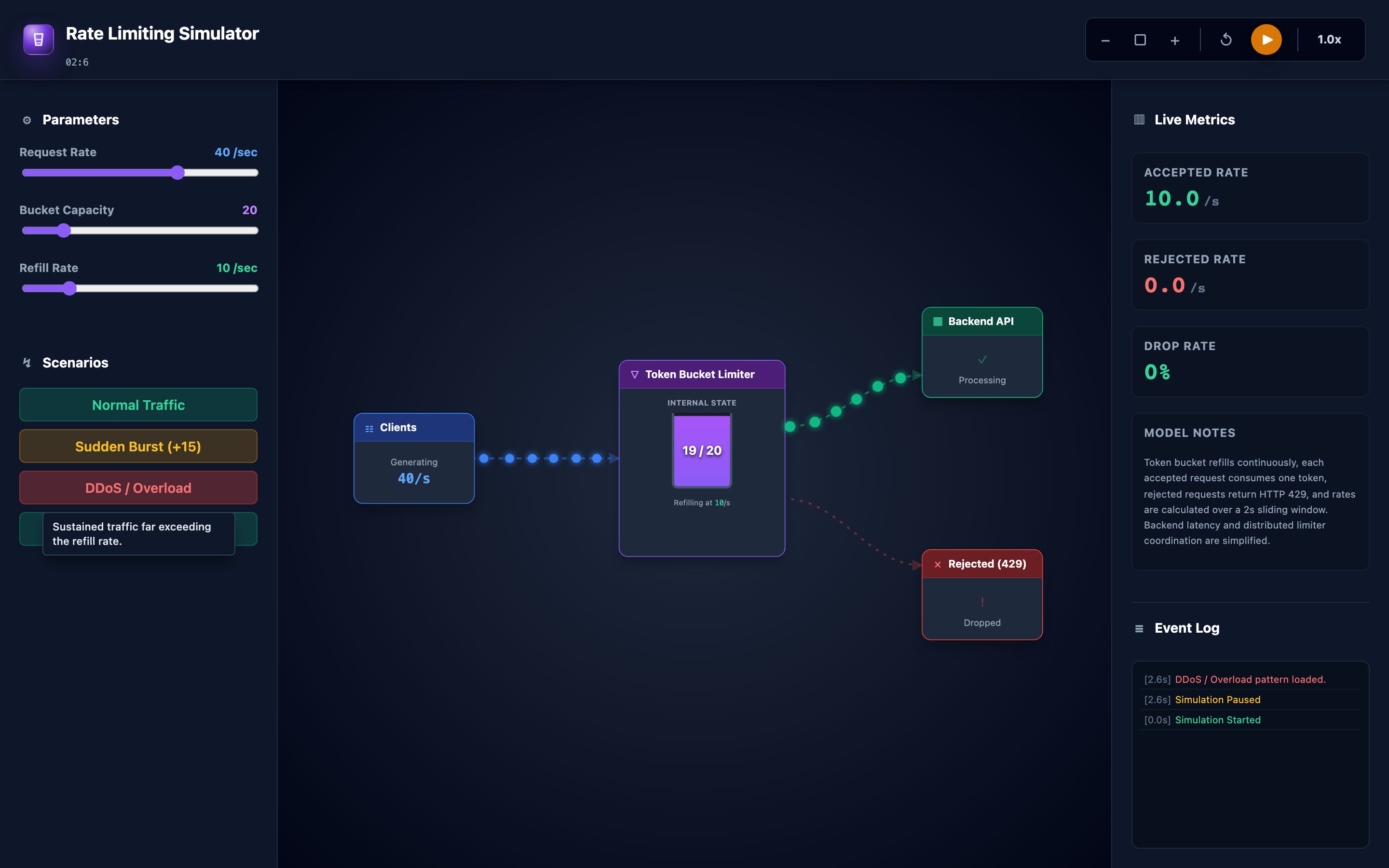
The interactive demo puts three sliders in your hands: request rate, bucket capacity, and refill rate. Start with normal traffic and watch tokens hold steady. Hit “Sudden Burst” and watch the bucket drain in real time — accepted requests stay high while tokens last, then drop to zero as rejections spike.
Trigger “Overload/DDoS” and see sustained rejection rates. Then ease the traffic back and watch recovery dynamics.
Try the interactive Rate Limiting demo — adjust request rate, bucket capacity, and refill rate in real time. Trigger burst and DDoS scenarios and watch how the token bucket responds.