TCP Congestion Control and Internet Stability
Learn how TCP congestion control uses slow start, AIMD, cwnd, ssthresh, and fast retransmit to prevent congestion collapse.
Why this matters
In 1986, the internet nearly collapsed. The NSFnet backbone throughput dropped from 32 Kbps to 40 bps — a 1,000x reduction. The cause was congestion collapse: every sender was transmitting at full speed, routers were dropping packets, senders were retransmitting those packets (adding more traffic), and the cycle spiraled until the network carried almost no useful data, only retransmissions.
Van Jacobson’s solution — TCP congestion control — is why the modern internet works at all. Every TCP connection dynamically probes the network’s capacity, backs off when it detects congestion, and gradually increases its send rate when the path is clear. Without this mechanism, Netflix’s 15% share of global internet traffic would obliterate every other service on shared network links.
But congestion control is a set of tradeoffs, not a solved problem. Too aggressive and you cause packet loss for other flows. Too conservative and you underutilize a 10 Gbps link, getting only 2 Gbps of throughput.
Modern algorithms like BBR and CUBIC make different bets on how to detect congestion, and each creates its own failure modes — from bufferbloat adding 500ms of latency to live video calls, to BBR starving loss-based flows of their fair share.
Practical note Congestion control is a negotiation with the network. Throughput, fairness, queueing delay, and loss are all signals, and optimizing one blindly usually hurts another.
The mental model
TCP congestion control centers on two variables maintained by the sender: the congestion window (cwnd) — how many packets can be in flight without acknowledgment — and the slow start threshold (ssthresh) — the boundary between exponential and linear growth.
Slow Start: A new connection starts with cwnd = 1 MSS (Maximum Segment Size, typically 1,460 bytes). For every ACK received, cwnd increases by 1 MSS. Since each RTT doubles the number of acknowledged packets, cwnd effectively doubles every round-trip — exponential growth.
On a 100ms RTT link, cwnd goes from 1 to 2 to 4 to 8 to 16 packets in just 500ms, quickly probing the network’s capacity.
Congestion Avoidance: When cwnd reaches ssthresh, TCP switches to linear growth: cwnd increases by 1 MSS per RTT instead of doubling. This is the Additive Increase phase. On a 10 Mbps link with 100ms RTT, the bandwidth-delay product is ~122 packets. Linear growth from ssthresh = 64 to the optimal 122 takes 58 RTTs (5.8 seconds), trading speed for safety.
Packet Loss Detection: When the router’s queue overflows, it drops packets (Drop-Tail). The receiver generates duplicate ACKs for missing packets. After 3 duplicate ACKs, the sender triggers Fast Retransmit — retransmitting the lost packet without waiting for the expensive retransmission timeout (RTO).
The new ssthresh is set to cwnd / 2, and cwnd is reset to ssthresh. This is the Multiplicative Decrease: cut the window in half on loss.
Timeout (RTO): If no ACKs arrive at all, the retransmission timer fires. This is catastrophic for performance: cwnd drops to 1 MSS and slow start begins again from scratch. A single timeout on a high-bandwidth connection can take 10+ seconds to recover from.
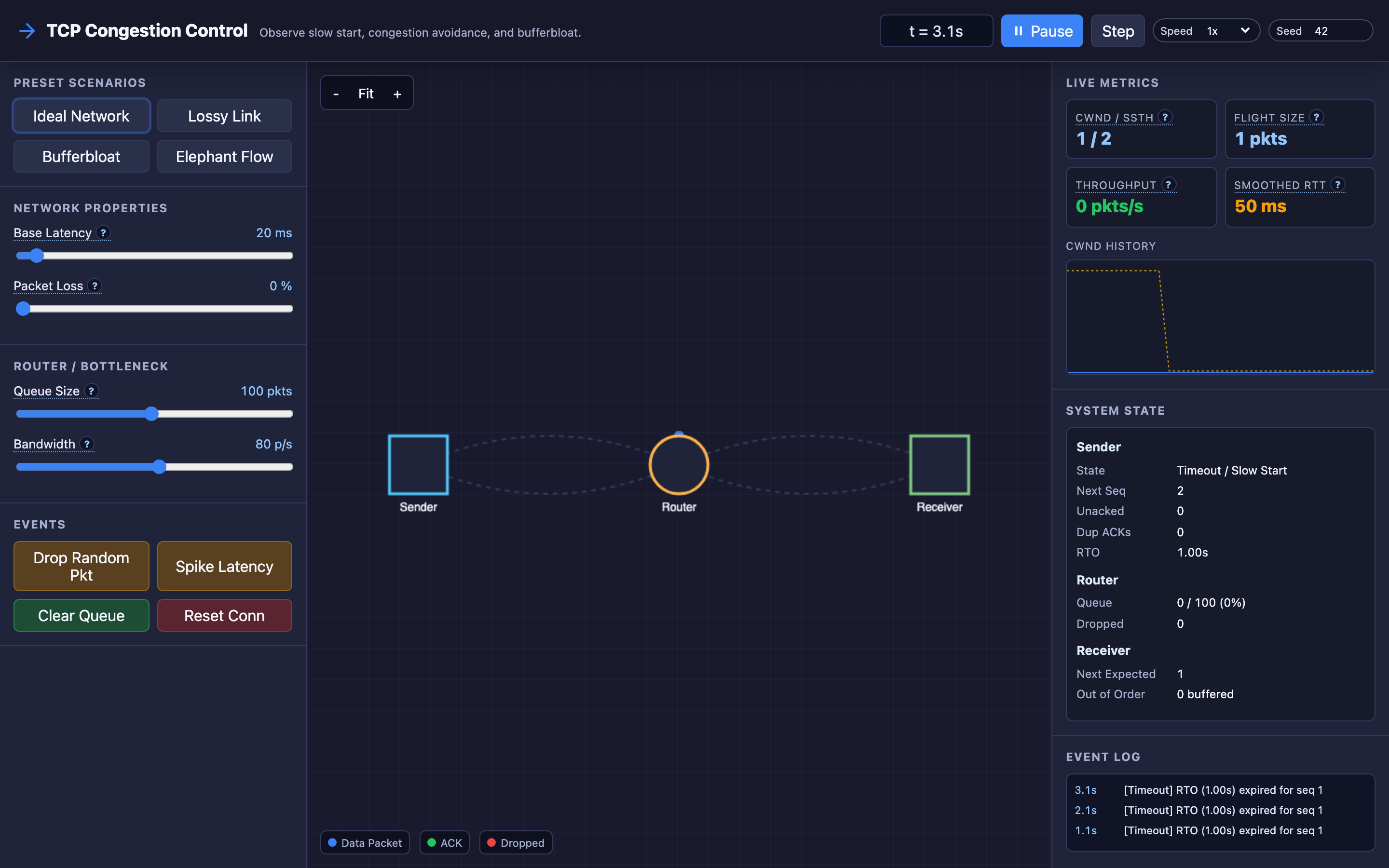
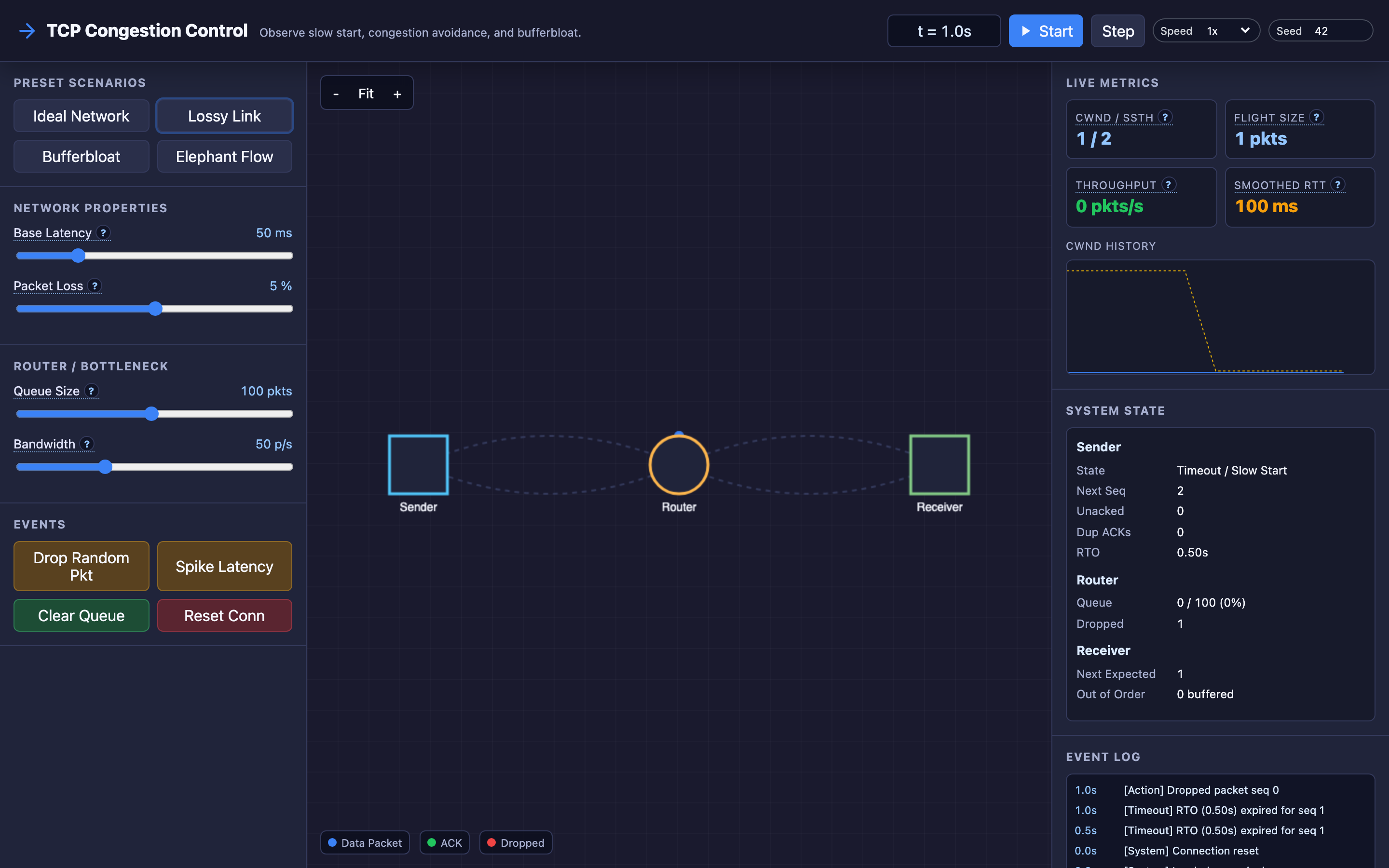
The interactive demo lets you manipulate these mechanics directly: adjust base latency and packet loss probability, change router queue size and bottleneck bandwidth, and manually drop packets or spike latency to watch the sender react in real time.
Decisions that matter
| Parameter | Range / Options | Low End | High End |
|---|---|---|---|
Initial cwnd (IW) | 1–10 MSS (modern default: 10) | IW=1 — safe but slow; takes 4 RTTs to fill a typical web page response | IW=10 — faster page loads (saves 2–3 RTTs for small transfers) but risks overwhelming slow links |
| Router queue size | 1–1000 packets | Small queues (10 packets) drop packets early, giving fast congestion signals but reducing throughput on bursty traffic | Large queues (500+ packets) absorb bursts but mask congestion, causing bufferbloat — latency spikes without packet loss |
| Bottleneck bandwidth | 1 Mbps – 10 Gbps | Low bandwidth bottlenecks cause frequent queue overflows and packet drops; cwnd oscillates aggressively | High bandwidth with high latency (long fat networks) requires enormous cwnd values; traditional slow start takes minutes to fill the pipe |
| Random packet loss probability | 0% – 10% | 0% — congestion is only detected by queue overflow, ideal for wired networks | 5%+ — common on wireless networks; loss-based algorithms mistake random loss for congestion and throttle unnecessarily |
| Base latency (RTT) | 1ms – 500ms | Low RTT (1–5ms, datacenter) — fast feedback loop; cwnd adjusts quickly; high throughput | High RTT (200ms+, intercontinental) — slow feedback; takes seconds to probe capacity; makes loss recovery expensive |
Where it breaks: Bufferbloat — Excessive Router Queues Masking Congestion
The failure mode: A home router has a 500-packet buffer serving a 10 Mbps DSL link. A large file download fills the buffer. The TCP sender sees no packet loss (the buffer absorbs everything) and keeps increasing cwnd.
The buffer holds 500 packets × 1,500 bytes = 750 KB of data. At 10 Mbps, draining this buffer takes 600ms. Every packet queued behind this buffer — including real-time VoIP packets, DNS queries, and SSH keystrokes — experiences 600ms of additional latency.
The video call stutters, web pages feel sluggish, and ping shows 650ms instead of the usual 50ms.
What you will notice:
pingto the gateway shows latency increasing from5msto600ms+ under load, then dropping back when the download finishesmtrortracerouteshows the latency spike at the first hop (local router), not at any intermediate hop- TCP throughput appears normal (10 Mbps) — no packet loss is visible in sender metrics, which is exactly the problem
- Real-time applications (VoIP, gaming, video conferencing) become unusable during file transfers even though bandwidth looks “fine”
- In the interactive demo, large queue sizes show latency climbing steadily while packet loss stays at zero
What I would do:
Deploy Active Queue Management (AQM) on the router. CoDel (Controlled Delay) and FQ-CoDel (Fair Queuing + CoDel) algorithms detect bufferbloat by measuring how long packets spend in the queue, not just whether the queue is full:
# Linux: enable FQ-CoDel on the WAN interface
tc qdisc replace dev eth0 root fq_codel

# Verify the qdisc is active
tc -s qdisc show dev eth0
# Output includes: target 5ms interval 100ms
FQ-CoDel maintains per-flow fairness (the download doesn’t starve the VoIP call) and targets 5ms of queue delay. When a packet has been in the queue longer than 5ms, CoDel starts dropping packets to signal congestion — even though the queue isn’t full. This gives TCP the congestion signal it needs to reduce cwnd before latency becomes unbearable.
For end-users, SQM (Smart Queue Management) in OpenWrt routers applies FQ-CoDel with rate limiting to match the actual link speed, preventing the ISP’s own buffers from bloating:
# OpenWrt SQM configuration
option enabled '1'
option interface 'wan'
option download '9500'   # 95% of actual download speed in Kbps
option upload '900'      # 95% of actual upload speed in Kbps
option qdisc 'fq_codel'
Hint Load the interactive demo’s “Bufferbloat” preset to see how large router queues mask congestion. Watch latency climb steadily while packet loss stays at zero — then enable FQ-CoDel to see the difference.
Where it breaks: Throughput Collapse From Aggressive Window Reduction
The failure mode: A server in New York sends data to a client in Tokyo over a 200ms RTT, 1 Gbps link. The bandwidth-delay product is 1,000,000,000 × 0.2 / 8 / 1500 ≈ 16,667 packets. TCP CUBIC takes 16,667 RTTs (55 minutes!) in congestion avoidance to grow cwnd from ssthresh to the optimal value.
Meanwhile, a single packet loss during this ramp-up cuts cwnd in half — from 8,000 packets back to 4,000. Throughput drops from 480 Mbps to 240 Mbps instantly. On a satellite link (600ms RTT), the problem is 3x worse.
What you will notice:
ss -ion the sender showscwndoscillating between 4,000 and 8,000 instead of reaching the optimal 16,667iperf3 -c tokyo.server.com -t 60shows throughput plateauing at 300–500 Mbps on a 1 Gbps linknstat -s | grep TCPLossshows sporadic loss events that trigger multiplicative decrease- Latency is low and stable (no bufferbloat), but throughput is far below the link capacity
- In the interactive demo, high RTT with any packet loss shows
cwndsawtooth patterns that never reach the optimal window
What I would do:
Switch to BBR (Bottleneck Bandwidth and Round-trip propagation time), Google’s congestion control algorithm that doesn’t rely on packet loss as a congestion signal. Instead, BBR estimates the bottleneck bandwidth by measuring delivery rate and the propagation RTT by tracking minimum round-trip time:
# Enable BBR on Linux
echo "net.core.default_qdisc=fq" >> /etc/sysctl.conf
echo "net.ipv4.tcp_congestion_control=bbr" >> /etc/sysctl.conf
sysctl -p

# Verify BBR is active
sysctl net.ipv4.tcp_congestion_control
# Output: net.ipv4.tcp_congestion_control = bbr
BBR maintains throughput near the link capacity regardless of packet loss, because it paces packets at the estimated bottleneck bandwidth rate instead of growing cwnd until packets drop. On a 200ms RTT, 1 Gbps link, BBR reaches full throughput in 4–6 RTTs (1–2 seconds) instead of 55 minutes.
For application-layer optimization on long fat networks, enable TCP window scaling (default in modern OS) and use parallel connections (aria2c -x 16 or HTTP/2 multiplexing) to fill the pipe with multiple smaller flows.
Where it breaks: Unfairness Between BBR and Loss-Based Flows
The failure mode: On a shared 100 Mbps link, five flows use CUBIC (loss-based) and one flow uses BBR (delay-based). BBR estimates the bottleneck bandwidth at 100 Mbps and tries to send at that rate.
The five CUBIC flows, following AIMD, collectively back off when they see packet loss — loss caused by BBR filling the buffer. BBR captures 60–70% of the link bandwidth while the five CUBIC flows share the remaining 30–40%.
Each CUBIC flow gets 6–8 Mbps instead of the fair 16.7 Mbps. Users on CUBIC connections experience degraded performance because one BBR flow monopolizes the bottleneck.
What you will notice:
iperf3between different hosts on the same network shows one flow getting 60+ Mbps while others get 6–8 Mbpsss -ishows the BBR flow withsend Xbps bbrand CUBIC flows withsend Ybps cubicwhere X >> Y- Router queue statistics show the buffer is frequently near capacity, with the BBR flow responsible for most of the queued packets
- Fairness index (Jain’s fairness index) drops from 0.99 (all CUBIC) to 0.75 (mixed CUBIC + BBR)
- In the interactive demo, adding a BBR flow alongside loss-based flows shows asymmetric bandwidth allocation
What I would do:
BBR v2 (BBRv2) addresses fairness by responding to packet loss and ECN (Explicit Congestion Notification) signals, not just delay. It reduces sending rate when it detects loss, making it coexist more fairly with CUBIC:
# Check if BBRv2 is available (requires kernel 5.18+)
modprobe tcp_bbr2 2>/dev/null && echo "BBRv2 available" || echo "BBRv2 not available"

# If available:
echo "net.ipv4.tcp_congestion_control=bbr2" >> /etc/sysctl.conf
Enable ECN (Explicit Congestion Notification) on both endpoints and intermediate routers. ECN allows routers to mark packets instead of dropping them, giving all congestion control algorithms a fairer signal:
# Enable ECN on Linux
sysctl -w net.ipv4.tcp_ecn=1

# Verify ECN is active
sysctl net.ipv4.tcp_ecn
For network operators, deploy FQ-CoDel at the bottleneck router. The fair queuing component ensures each flow gets an equal share of bandwidth regardless of the congestion control algorithm, preventing any single flow from monopolizing the link.
Warning Mixing BBR and CUBIC on shared links without AQM can starve loss-based flows. If you deploy BBR on your servers, ensure FQ-CoDel is active at bottleneck routers to maintain fairness.
The tradeoff
| Approach | Pros | Cons |
|---|---|---|
| CUBIC (loss-based, Linux default) | Well-understood; fair with other loss-based flows; stable in most environments | Underperforms on high-RTT links; mistakes wireless loss for congestion; slow to ramp up on long fat networks |
| BBR (delay-based) | Achieves near-optimal throughput regardless of packet loss; fills long fat pipes quickly | Unfair to loss-based flows on shared links; can cause excessive retransmissions; BBRv1 is aggressive |
| BBRv2 (loss + delay hybrid) | Better fairness than BBRv1; responds to ECN; reduced retransmission rate | Still experimental; not yet the default in any major OS; requires kernel 5.18+ |
| Large router queues (Drop-Tail) | Absorbs traffic bursts; reduces packet loss count | Causes bufferbloat; masks congestion signals; adds hundreds of milliseconds of latency |
| FQ-CoDel (AQM) | Controls queuing delay to 5ms target; per-flow fairness; drops packets early to signal congestion | Requires router/switch configuration; not available on all network hardware; adds minor CPU overhead to routers |
| ECN (Explicit Congestion Notification) | Avoids packet loss entirely (marks instead of drops); works with all CC algorithms | Requires support on both endpoints and all intermediate routers; not universally deployed; some middleboxes strip ECN bits |
Hint For servers handling long-distance connections (CDNs, cloud providers), BBR typically outperforms CUBIC. For datacenter east-west traffic with low RTT, CUBIC is fine. Use the interactive demo to compare both under your expected network conditions.
A practical checklist
Step 1: Diagnose bufferbloat. Run ping to your gateway while starting a large download. If latency jumps from <10ms to 200ms+, you have bufferbloat. Use the DSLReports speed test or flent for a comprehensive measurement: flent rrul -p all_scaled -l 60 -H your.server.ip.
Step 2: Enable FQ-CoDel. On Linux servers: tc qdisc replace dev eth0 root fq_codel. On home routers: install OpenWrt and enable SQM with FQ-CoDel. Verify with tc -s qdisc show — you should see target 5000us interval 100000us.
Step 3: Check your congestion control algorithm. Run sysctl net.ipv4.tcp_congestion_control. For servers handling long-distance connections (CDNs, cloud providers), BBR typically outperforms CUBIC. For datacenter east-west traffic with low RTT, CUBIC is fine.
Step 4: Tune initial congestion window. Modern Linux defaults to IW=10. For very small web responses (<14 KB), this means the entire response fits in the initial window and completes in a single RTT. Verify with: ip route show | grep initcwnd.
Step 5: Monitor TCP retransmission rates. Use nstat -s | grep -i retrans or Prometheus node_netstat_Tcp_RetransSegs. A healthy wired network should show retransmission rates below 0.1%. Above 1% indicates persistent congestion or link-layer issues.
Step 6: Test with the interactive demo. Load the Bufferbloat preset to see how large queues mask congestion. Load the Lossy Link preset to see how random packet loss (wireless) triggers unnecessary cwnd reductions. Use manual packet drop events to watch Fast Retransmit in action.
Try it yourself
Understanding cwnd growth, ssthresh, and AIMD from equations is useful. Watching packets actually queue at a router, seeing the congestion window sawtooth in real time, and triggering a manual packet drop to watch 3 duplicate ACKs fire Fast Retransmit — that builds intuition no textbook can match.
Launch the TCP Congestion Control Simulator → Load preset scenarios (Ideal Network, Lossy Link, Bufferbloat, Elephant Flow), tweak network properties and router settings, and trigger real-time events to see how TCP reacts to every kind of network condition.