How Platforms Ship Features to 1% of Users Before Everyone Else
Learn how feature flags enable progressive delivery, segment rollouts, kill switches, and A/B tests without creating flag debt.
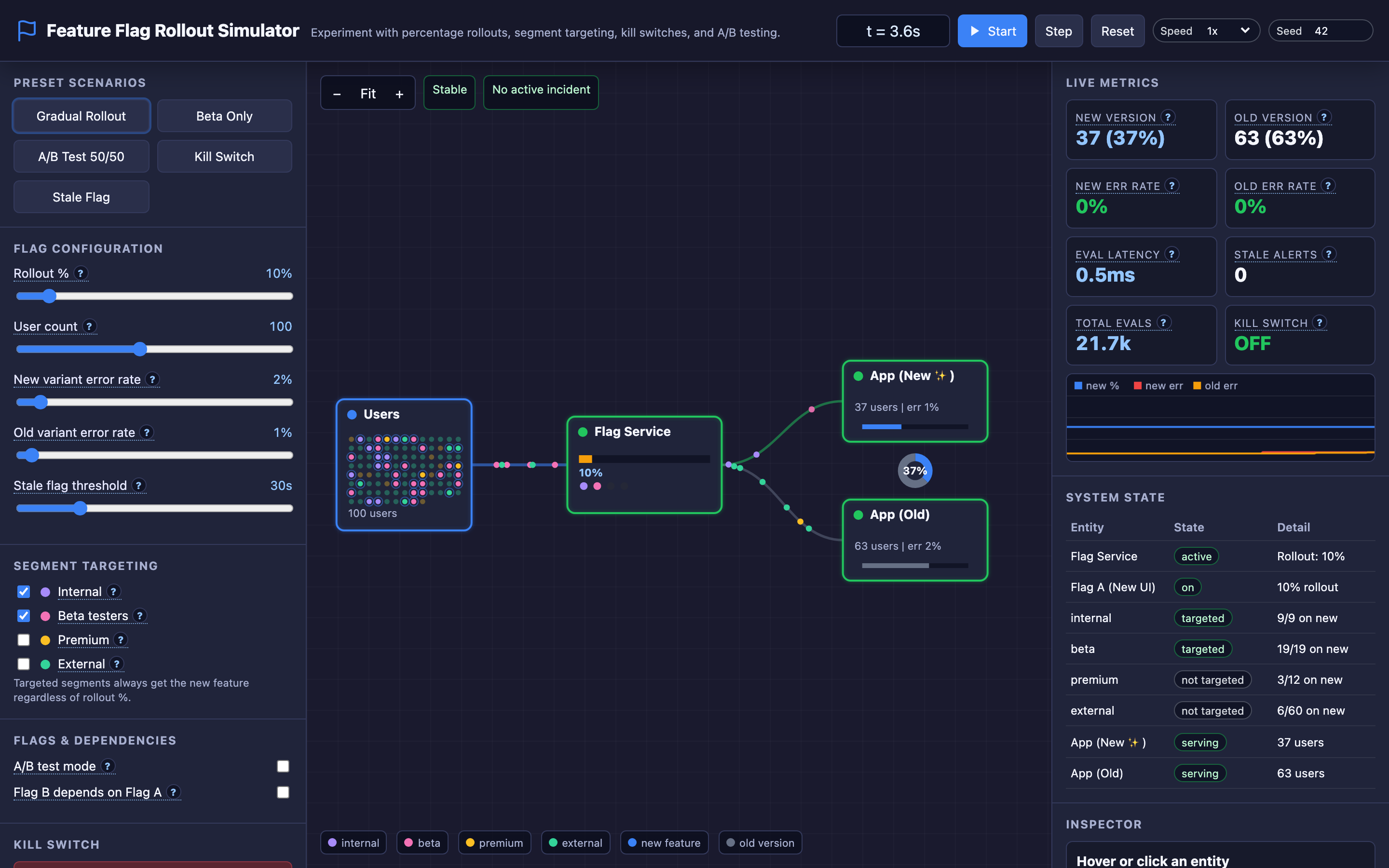
Why this matters: Deploying Code and Releasing Features Are Two Different Things
Traditional deployment means shipping code directly to all users at once. If the new checkout flow has a bug that doubles the error rate on payment processing, 100% of your users experience it simultaneously. Rolling back requires another full deployment cycle — 10 to 30 minutes in most CI/CD pipelines. During that window, you’ve already lost revenue and trust.
The fundamental problem is coupling deployment (putting code on servers) with release (exposing functionality to users). Every deploy becomes a high-stakes all-or-nothing event. Teams compensate by adding more manual QA gates, longer staging cycles, and heavier approval processes — all of which slow delivery velocity to a crawl.
Feature flags decouple these two concerns. You deploy code that’s wrapped in a conditional check: if (featureFlags.isEnabled("new-checkout", user)). The code sits on every server, but the flag controls who actually executes it.
You start at 1% of users, monitor error rates and latency for 30 minutes, bump to 10%, wait again, then gradually roll to 100%. If something breaks at 5%, you flip the kill switch and 95% of users never knew there was a problem.
Practical note Feature flags are release infrastructure, not just if-statements. Every flag needs an owner, an expiry date, and a cleanup path.
The mental model: Consistent Hashing, Segments, and Kill Switches
The core of a feature flag system is deterministic evaluation. When a user hits your service, their user ID is hashed against a seed value to produce a stable number between 0 and 100. If the rollout percentage is set to 15%, every user whose hash falls below 15 gets the new feature. The same user always gets the same result at a given percentage — no flickering between old and new behavior on page refreshes.
Segment targeting adds an override layer on top of percentage rollouts. You can target specific user groups — internal employees, beta testers, premium subscribers — and give them the new feature regardless of the rollout percentage. This means your QA team can test in production at 0% rollout, and beta users get early access at 5% rollout. Segment rules take priority over percentage rules.
The kill switch sits at the top of the evaluation hierarchy. When activated, it overrides everything — segments, percentages, dependencies — and returns the old variant for every single user. In an emergency, one API call or button press disables the feature globally. No redeployment. No waiting for CI/CD.
Flag dependencies create prerequisite chains. If “new-search-results” (Flag B) depends on “new-search-index” (Flag A), then Flag B can only be enabled for users who also have Flag A enabled. This prevents inconsistent experiences where a user sees new UI but the backend isn’t serving the new data format.
// Flag evaluation pseudocode
function evaluate(flag: Flag, user: User): Variant {
  // Kill switch has highest priority
  if (flag.killSwitch) return "control";

  // Check flag dependencies
  if (flag.dependency && !evaluate(flag.dependency, user))
    return "control";

  // Segment targeting overrides percentage
  if (flag.targetedSegments.includes(user.segment))
    return "treatment";

  // Percentage rollout via consistent hashing
  const hash = murmurhash(user.id + flag.seed) % 100;
  return hash < flag.rolloutPercentage ? "treatment" : "control";
}
Decisions that matter
| Parameter | Range | Low End Effect | High End Effect |
|---|---|---|---|
| Rollout Percentage | 0% – 100% | No users see the new feature. Safe for code deployment without exposure. | All users see the new feature. Equivalent to a traditional full release. |
| Segment Targeting | None – All segments | Only percentage-based rollout applies. Clean statistical sample. | Internal, beta, premium, and external users all targeted. Useful for dogfooding but skews A/B metrics. |
| Stale Flag Threshold | 7 days – 90 days | Aggressive cleanup. Flags at 100% for a week trigger removal alerts. Keeps codebase clean but adds toil. | Relaxed threshold. Flags linger for months. Less toil but code accumulates dead conditional branches. |
| A/B Test Mode | Off / 50-50 split | Standard progressive rollout. Optimize for safe delivery. | Locked 50/50 split for statistical comparison. Requires sufficient sample size (typically 10K+ users per variant). |
| Kill Switch | Off / On | Normal evaluation — percentage and segments apply. | Emergency override. All users get control variant instantly. |
Where it breaks: Flag State Desynchronization Across Nodes
The failure mode: Your flag evaluation service runs on 12 nodes behind a load balancer. Flag configuration is fetched from a central LaunchDarkly/Unleash server and cached locally on each node.
Node 7’s cache refresh fails silently due to a network partition. It continues serving stale flag state — the rollout is at 5% on node 7 while the other 11 nodes are at 30%. Users routed to node 7 by the load balancer get a different experience than users hitting other nodes.
What you will notice:
- A/B test metrics show inconsistent conversion rates across server instances
- Users report “the new feature appeared and then disappeared” — they’re hitting different nodes per request
- Application logs show
flag_evaluation{flag="new-checkout", variant="control"}on node 7 while all other nodes logvariant="treatment"for the same user IDs - The flag management dashboard shows the rollout at 30% but monitoring reveals only ~27% of traffic is actually seeing the treatment
What I would do: Implement local flag caching with a strict TTL and a health check on the cache refresh mechanism. If a node fails to refresh its flag cache within 2x the TTL, it should log an error and optionally fall back to a hardcoded default or stop serving traffic until the cache is refreshed.
Monitor the flag_cache_age_seconds metric per node and alert when any node’s cache exceeds the TTL.
Warning If your flag SDK falls back to stale cache silently, nodes can serve inconsistent variants for hours without any alert. Always set a
maxStalenessMslimit.
# Feature flag SDK configuration
flagService:
  pollingIntervalMs: 5000
  cacheTTLMs: 30000
  onCacheRefreshFailure: "log_error_and_use_stale"
  maxStalenessMs: 60000  # Fall back to defaults after 60s stale
  healthCheck:
    enabled: true
    endpoint: /internal/flags/health
Where it breaks: Stale Flag Defaults Causing Crashes in New Code Paths
The failure mode: A developer ships a new feature behind the flag enable-v2-pricing. The code path for the “treatment” variant calls a new pricing microservice. The “control” variant calls the legacy pricing function.
Six months later, the flag has been at 100% for five months. The team decommissions the legacy pricing service. Nobody removes the flag from the code. When the flag service goes down for 3 minutes during maintenance, the SDK falls back to its hardcoded default: false.
All traffic suddenly routes to the “control” code path, which calls the decommissioned legacy service. Every request returns a 503.
What you will notice:
- All pricing requests fail with
connection refusederrors to the legacy pricing service endpoint flag_evaluation_fallback_totalmetric spikes from 0 to 100% of evaluations- The flag management dashboard is unreachable (it’s also down during maintenance)
- Error rate jumps from 0.1% to 98% in under 30 seconds
- Application logs show
flag SDK using default value for "enable-v2-pricing": false
What I would do: Implement stale flag detection and lifecycle tracking. Set a stale flag threshold (e.g., 30 days at 100%) that triggers cleanup alerts.
Track every flag’s creation date, current rollout, and time since last change. Run a weekly report showing all flags at 100% for more than 30 days. When removing a flag, remove the conditional branch entirely and keep only the treatment code path.
Hint The interactive demo’s “Stale Flag” scenario demonstrates this exact failure. Try setting a flag to 100% and then disabling the flag service to watch the fallback default take over.
# Stale flag audit script
curl -s https://flags.internal/api/flags | jq '
  .[] | select(.rolloutPercentage == 100)
  | select((.lastModified | fromdateiso8601) < (now - 2592000))
  | {name, rolloutPercentage, lastModified, daysSinceChange:
      ((now - (.lastModified | fromdateiso8601)) / 86400 | floor)}
'
Where it breaks: Technical Debt from Flag Sprawl
The failure mode: Over 18 months, the team creates 247 feature flags. Only 30 are actively used for in-progress rollouts. The remaining 217 are either permanently at 100%, permanently at 0% (abandoned experiments), or partially rolled out and forgotten.
New developers can’t understand the code because every function has 3-4 nested flag checks. The flag evaluation service takes 45ms per request because it evaluates 247 flags for every page load. Unit tests have 2^n branches to cover.
What you will notice:
flag_evaluation_latency_p99climbs from2msto45msas flag count grows- Code coverage tools show hundreds of unreachable branches behind disabled flags
- New developer onboarding time increases from 2 weeks to 5 weeks
git log --all --oneline | grep "flag" | wc -lreturns 800+ commits touching flag logic- The flag management dashboard takes 10 seconds to load due to the number of flags
What I would do: Implement a flag lifecycle policy. Every flag must have an expiration date set at creation time. Flags at 100% for longer than the stale threshold trigger automated Jira tickets for code cleanup.
Assign flag ownership to specific teams. Run quarterly flag audits and treat flag removal as a first-class engineering task with allocated sprint capacity.
The tradeoff
| Approach | Pros | Cons |
|---|---|---|
| Remote flag evaluation | Instant updates. No redeployment needed. Centralized audit log. | Adds network latency per request. Flag service becomes a critical dependency. |
| Local SDK with caching | Fast evaluation (~1ms). Works during flag service outages (with stale data). | Cache staleness risk. Nodes can desynchronize. Requires TTL tuning. |
| Percentage-based rollout | Statistical safety. Gradual risk exposure. Easy to reason about. | Consistent hashing can create cohort bias if hash function isn’t uniform. |
| Segment targeting | Precise control. Great for dogfooding and beta programs. | Skews A/B metrics. Targeted segments aren’t representative of full population. |
| Long flag lifecycle | Less engineering toil. Teams focus on features, not cleanup. | Code complexity grows. Evaluation latency increases. Stale defaults become landmines. |
| Aggressive flag cleanup | Clean codebase. Fast flag evaluation. Fewer branches to test. | Requires dedicated sprint capacity for flag removal. Overhead of lifecycle tracking. |
Hint For most teams, a 30-day stale flag threshold combined with local SDK caching and a
30000msTTL offers the best balance of safety and developer velocity.
A practical checklist
Step 1: Audit your current flag inventory. Query your flag service API and categorize every flag: actively rolling out, permanently on, permanently off, or unknown. Flags at 0% for more than 30 days should be deleted. Flags at 100% for more than 30 days should have their code branches removed.
Step 2: Set up SDK health monitoring. Expose a /internal/flags/health endpoint that reports cache age, last successful refresh time, and number of flags loaded. Alert when cache age exceeds 2x the polling interval.
Step 3: Configure safe defaults. For every flag, explicitly set the fallback default to the value that represents current production behavior. If the flag has been at 100% for months, the default should be true, not false. Document this in the flag’s metadata.
Step 4: Implement stale flag alerts. Set a stale threshold of 30 days. When a flag stays at 100% for longer than the threshold, create an automated ticket. Include the flag name, owning team, creation date, and lines of code affected.
Step 5: Test kill switch behavior regularly. During each on-call rotation, practice toggling the kill switch for a non-critical flag. Measure how long it takes for all nodes to pick up the change. If it takes longer than 30 seconds, reduce the polling interval or implement a push-based notification system.
Try it yourself
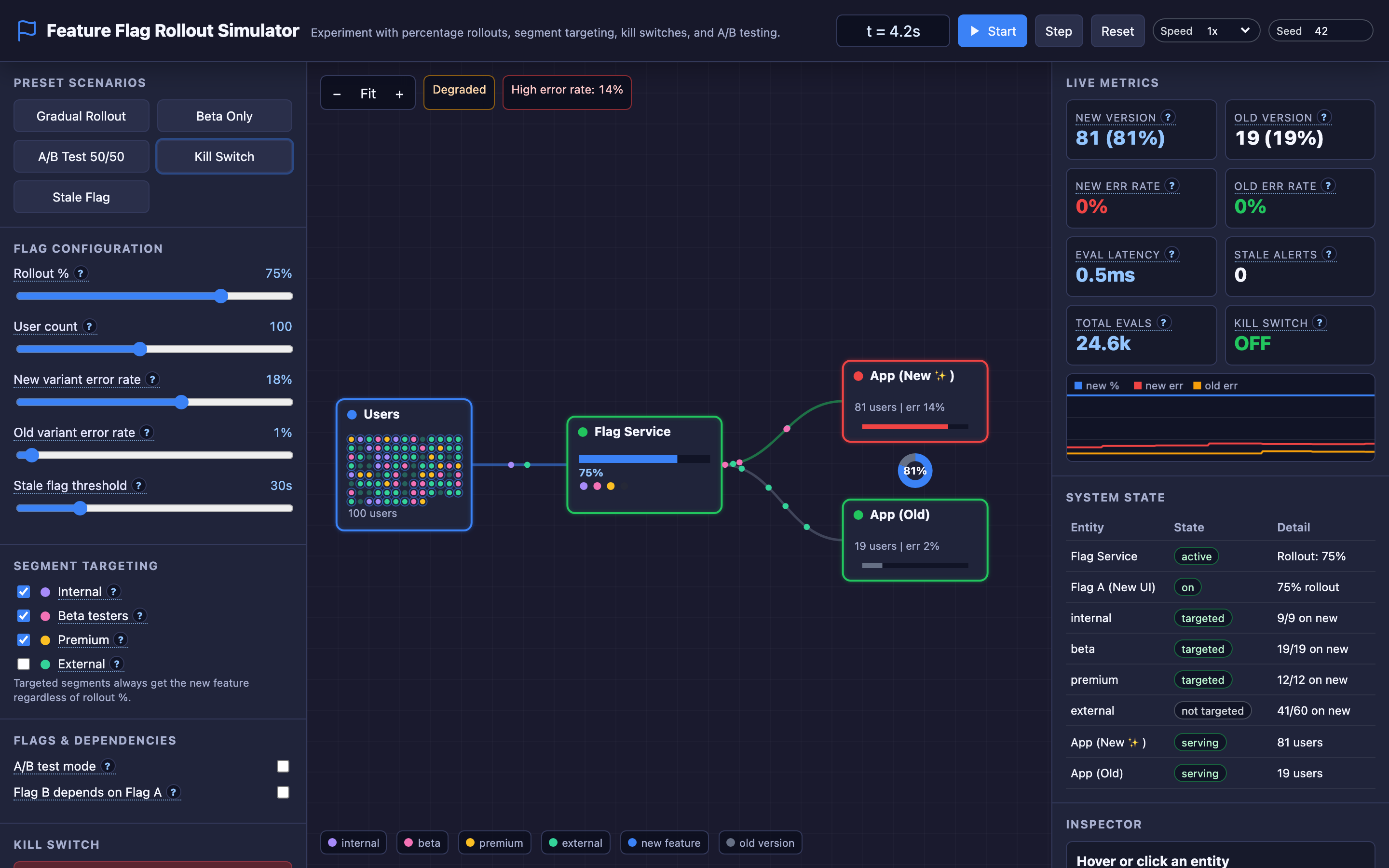
The interactive demo lets you drag the rollout slider from 0% to 100% and watch individual users — distributed across internal, beta, premium, and external segments — flip between control and treatment variants in real time. Toggle segment targeting to see how overrides work. Hit the kill switch and watch every user instantly revert. Enable flag dependencies and see how prerequisite chains prevent inconsistent states.
Try the interactive Feature Flag Rollout demo → Experiment with gradual rollouts, A/B test splits, stale flag detection, and emergency kill switches to build intuition for progressive delivery in production.